Volvicon
3D Image Processing, Visualization, and Analysis Software
Volvicon is a software application for processing, visualizing, and analyzing 3D image data. It covers the path from acquisition to result: reconstruct a volume from projection images or import one, segment it, determine its surface, measure and compare it, and prepare it for simulation. Any of that can be repeated from a Python script or from the command line. The actions that change a project are recorded as you work, so a result can be traced back to how it was produced.
It is used in industrial inspection, research, life sciences, and other fields that work with volumetric data.
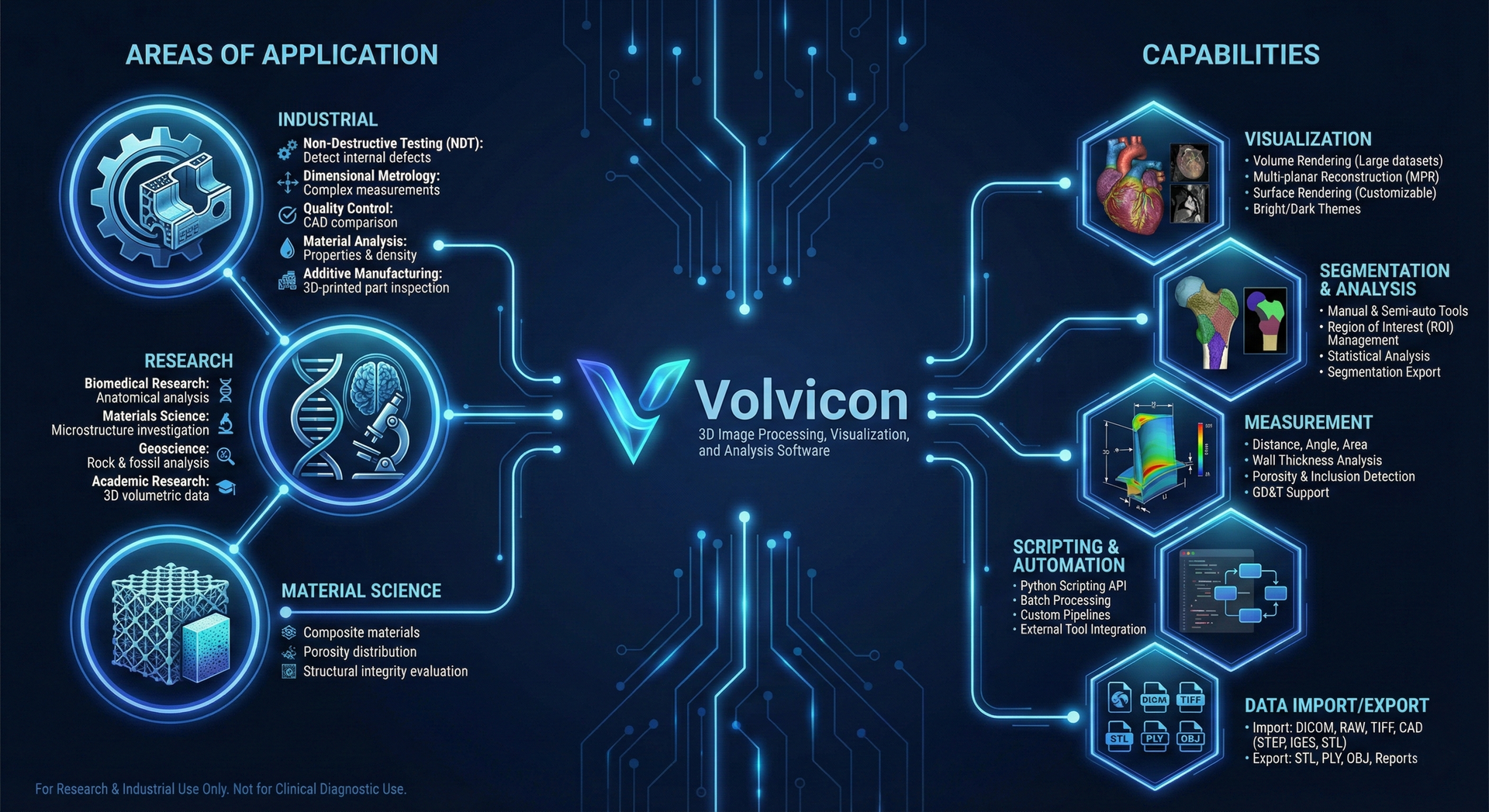
Areas of Application
Industrial
- Non-Destructive Testing (NDT): Detection and analysis of internal defects, porosity, and inclusions in manufactured components
- Dimensional Metrology: Measurements on complex geometries, including internal features inaccessible to traditional coordinate measuring machines
- Quality Control: Comparison of manufactured parts with CAD data for nominal/actual deviation analysis
- Material Analysis: Evaluation of material properties, density distribution, and structural integrity
- Additive Manufacturing: Inspection of 3D-printed parts for internal defects, dimensional accuracy, and build quality
Research
- Biomedical Research: Segmentation and analysis of anatomical structures from medical imaging data
- Materials Science: Investigation of material microstructure, porosity, and composite materials
- Geoscience: Analysis of rock samples, fossils, and geological formations
- Academic Research: Analysis of 3D volumetric data for research projects
Volvicon is intended for research and industrial use only. The software is not registered with the U.S. Food and Drug Administration (FDA) or certified under the European Medical Device Regulation (MDR) for clinical diagnostic use. Any application involving medical imaging for diagnostic or therapeutic purposes must comply with applicable regulatory requirements in your jurisdiction. For clinical applications, consult with your institution's regulatory affairs department.
What You Work With
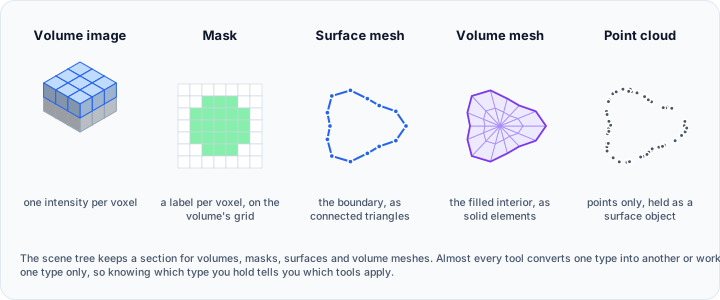
Volvicon holds five object types, and most workflows are a matter of converting between them. Fundamentals explains each one and the tool that produces it.
Capabilities
Data Import and Reconstruction
- Volume import from Meta Image, NIfTI, and NRRD files, DICOM series, ordered image stacks (BMP, JPG, PNG, TIF), and raw voxel data with manually specified geometry. See Import
- Import of surface and CAD geometry (IGES, STEP, STL, PLY), volume meshes, and content merged from another project
- Cone Beam Reconstruction of a volume from projection images, driven by the scan geometry, with optional dark and bright field correction of raw projections
- Registration of two datasets, either from landmark pairs you place or automatically, using surface or image features
- Image preparation including resampling, reslicing, cropping, padding, flipping, axis swapping, correction filters, smoothing and denoising, and morphology operations
Segmentation
- Intensity-based segmentation with Threshold and Multilevel Thresholding
- Surface Determination with a manual isovalue, the ISO50 level between the background and material gray values, one of twelve histogram methods, or an advanced local refinement along the surface normal. The resulting mask carries the surface with sub-voxel accuracy, and every later step that reads a mask surface uses it unchanged
- Region-based tools: Region Grow, Dynamic Region Grow, GrowCut, LiveWire, Watershed, and Voids and Inclusions
- Multi-label masks that hold several labeled regions in one object, with merging, extraction, and per-label statistics
- Mask refinement and correction: cavity fill, region filtering, splitting, interpolation between segmented slices, smoothing, Boolean combination, and manual work in Edit Mask and the 3D Editor
- AI Segmentation with TotalSegmentator, nnU-Net, MONAI, and Cellpose-SAM
Surfaces and Volume Meshes
- Conversion in every supported direction between volumes, masks, surfaces, and volume meshes, and Poisson Remesh to build a closed surface from a point cloud
- Diagnostics and Fixes that reports holes, shells, overlapping and intersecting triangles, and inconsistent normals, and repairs them, which is what a surface needs before Boolean operations, volume meshing, and 3D printing
- Surface editing: Boolean and voxel Boolean, hollow, extrude, engrave text, remesh, reduce, subdivide, smooth, cut, clip, split, merge, mirror, and project to plane
- Surface analysis: elevation map, surface distance, shortest path, collision detection, and shell inspection
- Volume meshing with the Mesh Quality Analyzer, FEM model configuration, and FEM export to Abaqus, Nastran, LS-DYNA, OpenFOAM, Fluent, and Gmsh
Measurement and Analysis
- Deviation Analysis for nominal versus actual comparison, measuring each point against the closest location on the reference surface rather than its closest vertex
- Wall Thickness Analysis across a mask or a surface, with optional tolerance evaluation against limits you specify
- Void and Inclusion Analysis that detects, segments, and quantifies internal porosity and inclusions
- Curvature, Extrema, and Gray Value analyses, managed together in the Analyses Editor
- Measurements including distance, angle, diameter, contour, circle, ellipse, rectangle, box, and annotation, plus Primitive Fitting and measurement between primitives
- Statistics for volumes, masks, surfaces, and volume meshes, with Compare Masks, volume similarity, the Slice Analyzer, and the profile line
- PDF reports of measurements, statistics, and analysis results
Visualization and Media
- Volume rendering, surface rendering with materials, and 2D slice views in any of the three orthogonal planes, arranged through layouts
- Curved Planar Reformat to straighten a curved structure along a path you define
- 3D clipping, window and level control, and the cine loop
- Light Studio for up to eight scene lights, floor shadows, studio presets, and reusable lighting setups
- Video recording as a turntable, an oscillating rock, a keyframed camera path, a live capture of your work, a slice sweep, or a timeline of tracks, written to MP4 or AVI at resolutions up to 4K
- Screenshots, printing, and a choice of light and dark interface themes
Automation and Scripting
- A Python Scripting API of more than 300 classes covering every object type and operation group, with a scripting editor inside the application
- A command line interface that opens projects, imports volumes, masks, surfaces, and volume meshes, runs a Python script, and closes when the script finishes
- Headless operation with no user interface for scheduled and unattended runs, which reports the outcome of the run as an exit code
- Status, system information, version, and license queries from the command line, answered without opening a window
- An AI Assistant that answers questions about Volvicon and writes Python scripts, runs them after you approve them, and offers a local mode that keeps your conversation on your own computer
Record of Work
- The Operation Log records where a project's data came from, what changed it, what was measured or checked, what was exported, and each time the project was opened and saved
- Search and filtering by category, object, outcome, source, and time, and export of the history to JSONL or CSV
- Copy Python Call on a recorded action, which yields the scripting call that repeats it, and read access to the history from a script
- Recording is always on, and the log states plainly when part of a history is not available
- Project files that verify their contents when opened and report anything missing, added, or modified
Data Export
- Volumes to Meta Image, NIfTI, NRRD, Analyze, GIPL, LSM, and VTK Image, to DICOM, or as an image stack
- Surfaces to STL, PLY, OBJ, 3MF, U3D, AMF, VRML, glTF, X3D, Open Inventor, tessellated STEP and IGES, VTK poly data, point files, and 3D PDF
- Volume meshes to the supported FEA solver formats, and the whole 3D scene including measurements and annotations
- Videos, screenshots, PDF reports, and exported statistics
Volvicon is offered in Standard, Professional, and Ultimate tiers. Volume meshing and FEM export, AI segmentation, and custom scripting require Professional or Ultimate. See Licensing Options for the full comparison and for the difference between node-locked and floating deployment.
Where to Start
- New to Volvicon: Installation, then The Interface and Getting Started with Volvicon
- Industrial CT inspection: Tutorial 1: Industrial CT Inspection, which works through a scan from import to measurement
- Medical and life science data: Tutorial 2: Medical CT, From AI Segmentation to Simulation
- Automation: Python Scripting Fundamentals and the Command Line Interface guide
Documentation Contents
This documentation covers:
- System Requirements: Hardware and software prerequisites
- Getting Started: Installation, licensing, and first steps
- Fundamentals: The object types, how each is created, and how they convert into one another
- User Interface: Interface components and navigation
- Ribbon Tabs: Tools and commands reference
- Tutorials: Step-by-step guides, including guided tutorials with sample data
- Scripting API: Python automation reference
- Command Line Interface: Arguments, scripted runs, and headless operation
- AI Assistant: Built-in chat assistant for questions and Python automation
- Product Information: Instructions for use, release notes, and DICOM conformance statements
- FAQ: Common questions and answers
- Legal: License agreements, terms, and policies
Technical Support
For technical support, feature requests, or bug reports, contact your software vendor or visit the support portal associated with your license agreement.