Dynamic Region Grow
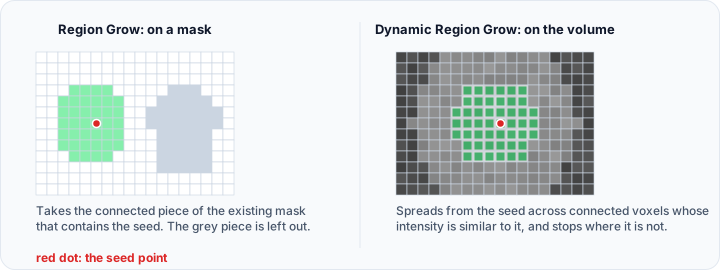
The Dynamic Region Grow tool segments the connected regions in the active volume object based on either similar gray value statistics or a specific range of gray values. You can choose between two region growing methods: Connectivity-based (analyzing statistical properties around seed points) or Threshold-based (segmenting within a specified intensity range).
Accessing the Tool
- Navigate to the Segmentation tab in the ribbon.
- Click Dynamic Region Grow in the Create Mask section.
Parameters
Region Growing Method
Choose the region growing method from the dropdown:
Connectivity
Identifies a connected set of pixels with pixel intensities matching the statistical properties of a seed point.
Parameters:
- Multiplier: 1.0 to 100.0 (default: 1.0)
- The multiplier to define the confidence interval for intensity similarity.
- Number of iterations: Minimum 0 (default: 1)
- The number of times the filter will run.
- Initial neighborhood radius (pixels): Minimum 1 (default: 1)
- The size of the initial neighborhood around the seed.
Threshold
Identifies pixels connected to a seed point with grayscale values within a specified range.
Parameters:
-
Threshold adjustment: Use the histogram to set minimum and maximum threshold values.
The distribution is drawn in the Interactive Histogram Chart, with the two thresholds shown as lines on it. Drag a line to move that threshold directly on the distribution. Drag the shaded area between the two lines to move the whole range without changing its width. Right-click the chart to reach its display options. This histogram is a preview for setting the threshold, not measurement data, so the chart's CSV export is not offered here; copying it to the clipboard or saving it as a picture still is.
-
Connectivity mode:
- 6-connectivity: Only the neighboring faces of the selected voxel are considered (default).
- 26-connectivity: The neighboring faces, nodes, and vertices of the selected voxel are considered.
Options
- Fill cavities: If checked, internal gaps in the mask will be filled. If unchecked, no gap filling will be applied.
- Multiple layer: If checked, the operation will be applied to all slices of the dataset. If unchecked, it will only be applied to the current slice (default: checked).
Result
- Target mask: Select the mask object where the segmentation result will be stored.
- Replace: Replace the selected mask with the segmentation calculated by this operation (default).
- Merge: Merge the segmentation calculated by this operation into the selected mask object.
Workflow
- Load your volume data and ensure it is the active volume object.
- Open the Dynamic Region Grow tool from the Segmentation tab.
- Select the Region growing method from the dropdown:
- Choose Connectivity for intensity-based statistical region growing
- Choose Threshold for range-based region growing
- Configure Method Parameters:
- For Connectivity method: Adjust Multiplier (default: 1.0), Number of iterations (default: 1), and Initial neighborhood radius (default: 1 pixel).
- For Threshold method: Use the histogram to set minimum and maximum threshold values, and choose 6-connectivity or 26-connectivity.
- Set Options:
- Enable Fill cavities if you want internal gaps filled.
- Enable/disable Multiple layer based on whether you want to segment all slices (default: checked).
- Configure Result settings:
- Select the Target mask where results will be stored.
- Choose Replace or Merge mode.
- Place seed point: Left-click on the object of interest in either the 2D or 3D view.
- Use Ctrl+drag in the 3D view to rotate while selecting.
- The region grows automatically from the seed point based on the selected method.
- Review the result and adjust parameters if needed, then place new seed points to refine.
How It Works
Dynamic region growing combines spatial connectivity with intensity analysis:
For Connectivity method:
- The algorithm starts at the seed point and records intensity statistics.
- Neighboring voxels are examined based on the multiplier and initial neighborhood.
- Voxels with intensities matching the statistical properties are added to the region.
- The process iterates the specified number of times, growing outward.
- The result is saved to the target mask.
For Threshold method:
- The algorithm starts at the seed point.
- Neighboring voxels are examined based on the connectivity setting.
- If a neighbor's intensity falls within the threshold range, it is added to the region.
- The process continues iteratively until no more qualifying voxels are found.
- The result is saved to the target mask.
Use Cases
- Organ Segmentation: Segment organs with relatively uniform intensity.
- Lesion Detection: Isolate lesions that differ in intensity from surrounding tissue.
- Vessel Extraction: Trace connected vascular structures.
Tips
- Connectivity Method: Best for regions with similar statistical properties; adjust the Multiplier to control sensitivity to intensity variations.
- Threshold Method: Best when you know the specific intensity range of your target region.
- Fill Cavities: Enable this to automatically fill holes in the segmented region.
- Multiple Layer: Enable for 3D segmentation across all slices; disable for slice-by-slice segmentation.
- Place the seed point in a representative area of the target structure.
- If the region leaks into adjacent structures (Threshold method), narrow the threshold range.
- If the region stops growing too early (Threshold method), widen the threshold range.
See Also
- Region Grow: grow regions within existing masks.
- Threshold: basic intensity thresholding.
- GrowCut: seed-based cellular automata segmentation.
- Segmentation Tab Overview: overview of all segmentation tools.