Fundamentals
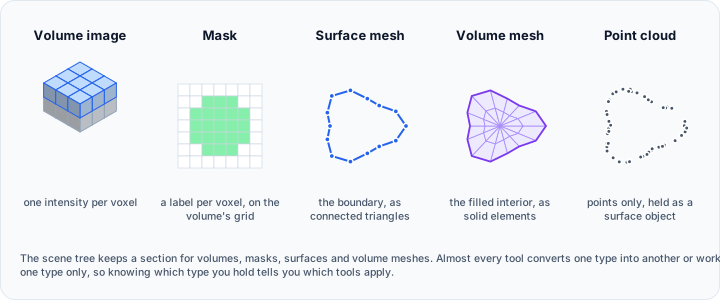
Volvicon works with a small number of object types. Almost every workflow is a matter of getting your data into the right type, and most questions about which tool to use are really questions about which type you are holding.
Object types
| Type | What it is | Where it comes from |
|---|---|---|
| Volume grayscale image | Three-dimensional image data, one intensity value per voxel | Imported from DICOM, TIFF, NIfTI, raw, and other volume formats |
| Mask | A binary or labeled volume marking selected voxels | Segmentation of a volume image, or conversion from a surface |
| Surface mesh | The outer boundary of an object, as connected triangles | Conversion from a mask or a volume mesh, an imported mesh file, or Poisson reconstruction of a point cloud |
| Volume mesh | The filled interior of an object, as solid elements | Conversion from a mask or a surface, or an imported FEM mesh |
| Point cloud | Points with no edges and no faces, held as a surface object | Imported .xyz files |
How one object type becomes another
Each conversion is a ribbon tool on the tab of the object you start from. This table gives the full ribbon path to each one. In the diagram below, each object lists the tools that produce it, and the arrows show which objects they start from.
| From | To | Ribbon tool |
|---|---|---|
| Volume image | Mask | Segmentation > Create Mask, using any of the volume-based segmentation tools, or Image > Convert > Volume To Mask |
| Mask | Volume image | Segmentation > Convert > Mask To Volume |
| Mask | Surface mesh | Segmentation > Convert > Mask To Surface |
| Mask | Volume mesh | Segmentation > Convert > Mask To Volume Mesh |
| Surface mesh | Mask | Surface > Convert > Surface To Mask |
| Surface mesh | Volume mesh | Surface > Convert > Surface To Volume Mesh |
| Volume mesh | Surface mesh | Volume Mesh > Convert > Volume Mesh To Surface |
| Point cloud | Surface mesh | Surface > Edit > Additional > Poisson Remesh |
The routes that do not exist matter as much as the ones that do.
- There is no direct conversion from a volume image to a surface mesh. The Isosurface Renderer shows a surface in the 3D view but does not create a surface object. Segment the volume into a mask first, then use Mask To Surface.
- There is no direct conversion from a volume mesh to a mask, and none from a surface mesh to a volume image. Route through a mask.
- AI Segmentation on the Advanced tab also produces masks from a volume image.
- Surface To Volume Mesh needs a clean, watertight surface. Use Diagnostics and Fixes first if the surface has holes, non-manifold edges, or self-intersections.
In this section
- Volume Grayscale Image: the primary data type, and how spacing, origin, and intensity work.
- Masks: binary and multi-label masks, and what a label value means.
- Surface Mesh: triangles, mesh quality, and point clouds.
- Volume Mesh: solid elements for finite element analysis.
- Measurements: distances, angles, and areas in physical coordinates.
- Primitives: geometric shapes used as regions of interest and references.
- Rendering Types: the rendering methods available for each object type.
- Project Files: what a project stores and what is verified when it is opened.
- Scripting API: programmatic access to the same operations through Python.