Multilevel Thresholding
The Multilevel Thresholding tool automatically generates multiple segmentation masks from the target volume objects. It identifies different regions or objects within the volume image and creates a set of segmentation masks to capture these distinct areas. You can choose between Otsu's method (maximizing between-class variance) or K-means clustering for threshold determination.
Accessing the Tool
- Navigate to the Segmentation tab in the ribbon.
- Click Multilevel Thresholding in the Create Mask section.
How It Works
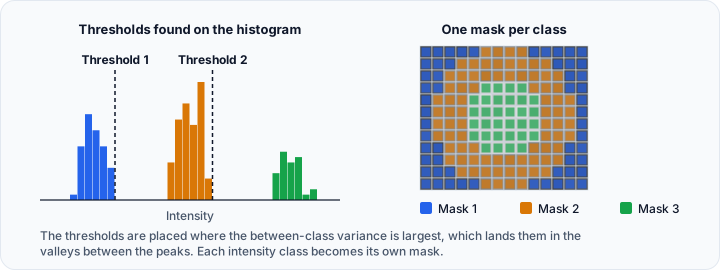
Otsu's multilevel thresholding algorithm:
- Analyzes the intensity histogram of the volume.
- Evaluates all possible threshold combinations.
- Selects thresholds that maximize the variance between resulting classes.
- Each class represents a distinct intensity range.
This method is particularly effective when the histogram shows clear multi-modal distribution (multiple peaks).
Parameters
Target Object(s)
- Description: Select the target volume objects on which the operation will be applied
- Options: Active Volume, Selected Volumes, Visible Volumes, All Volumes
Options
Thresholding Method
Choose the algorithm for automatic threshold determination:
- Otsu: Otsu thresholding is a global thresholding technique that selects the optimal thresholds by maximizing the between-class variance of the resulting segmented regions.
- K-means: K-means thresholding is a clustering-based approach to image segmentation. It partitions the image pixels into K clusters based on their intensity values, and the cluster centroids are then used as the thresholds for segmentation.
Number of Masks
- Description: The number of desired masks to generate
- Range: 1 to 999
- Default: 2
- Effect: Specifies how many distinct regions/classes the algorithm will identify
Workflow
- Open the Multilevel Thresholding tool from the Segmentation tab.
- Select the Target object(s) (Active Volume, Selected Volumes, Visible Volumes, or All Volumes).
- Choose the Thresholding method (Otsu or K-means).
- Set the Number of masks based on the expected number of distinct tissue types or regions.
- Click Apply to run the automatic threshold analysis.
- Review the generated masks. The tool creates separate mask objects for each identified region.
Use Cases
- Multi-tissue Segmentation: Automatically separate bone, soft tissue, and air in CT images.
- Material Analysis: Distinguish different material densities in industrial CT scans.
- Initial Segmentation: Create a starting point for further refinement.
The algorithm works best when different structures have distinct intensity peaks in the histogram. If structures have overlapping intensities, consider using other segmentation methods.
Tips
- Otsu Method: Best for images with clear multi-modal intensity distribution (distinct peaks in histogram)
- K-means Method: More flexible for varying intensity patterns; uses clustering instead of variance maximization
- Number of Masks: Start with a small number (2–3) and increase if needed
- Target Selection: Use "Active Volume" for single volume processing, or "Selected Volumes" for batch processing
- Review the histogram to understand the intensity distribution before running
- Use the resulting masks as starting points for more refined segmentation
- Combine with filtering operations to clean up the results
Technical Background
Otsu's method finds thresholds that minimize within-class variance (or equivalently, maximize between-class variance). For multilevel thresholding with thresholds , the algorithm maximizes:
Where:
- is the probability of class
- is the mean intensity of class
- is the total mean intensity
See Also
- Threshold: manual threshold segmentation.
- Surface Determination: single-value threshold.
- Multi-label Mask: working with multi-label masks.
- Segmentation Tab Overview: overview of all segmentation tools.