Mask Statistics
The Mask Statistics tools provide statistical analysis of mask objects in your workspace. This dropdown menu in the Measure ribbon tab contains five tools for analyzing masks from different perspectives.
If you're working with defect detection, see Void/Inclusion Analysis which provides the same measurements and report sections but with defect-oriented wording (for example, "voids", "inclusions", or "defects") instead of generic mask-label terms.
Accessing Mask Statistics
- Navigate to the Measure ribbon tab
- Click the Mask Statistics dropdown button in the Statistics section
- Select the appropriate analysis tool
The menu holds five entries:
| Entry | Analyses |
|---|---|
| Whole Mask/Slice Statistics | The complete mask, or its current slice |
| Per-Region Mask Statistics | Each connected component of the active mask, from the voxels |
| Per-Label Mask Statistics | Each label of the active multi-label mask, from the voxels |
| Per-Region Mask 3D Preview Statistics | Each connected region of the mask's 3D preview mesh |
| Per-Label Mask 3D Preview Statistics | Each label of the multi-label mask's 3D preview mesh |
- Whole Mask/Slice: Aggregate numbers for a mask, or a slice-by-slice reading
- Per-Region: Individual disconnected components in a binary mask
- Per-Label: Multi-structure segmentations, for example an AI result
- 3D Preview tools: Mesh measurements such as surface area, enclosed volume, and triangle counts, which the voxel-based tools do not provide
Only Whole Mask/Slice Statistics offers a target selection (active mask or visible masks). The other four always use the active mask, so activate the right one in the scene tree first.
Whole Mask/Slice Statistics
Compute statistics for the complete mask volume or analyze individual slices along any axis.
Description
This tool calculates shape and intensity statistics for entire mask objects or on a per-slice basis. Results are displayed in tabular format with options to select which statistics to compute.
Target Selection
| Option | Description |
|---|---|
| Active mask | Analyze only the currently selected mask |
| Visible masks | Analyze all masks that are currently visible |
Slice Selection
The Slice list decides whether the whole mask or one current slice is analysed. The slice entries are named after the scene orientation preset selected in View ▸ Scene ▸ Orientations.
| Option | Description |
|---|---|
| Current Plane 1 (YZ) slice | Analyse only the current Plane 1 (YZ) slice |
| Current Plane 2 (XZ) slice | Analyse only the current Plane 2 (XZ) slice |
| Current Plane 3 (XY) slice | Analyse only the current Plane 3 (XY) slice |
| All slices | Analyse the entire mask (default) |
Statistics update as you scroll through slices, so a slice mode reports the values of exactly the slice on screen.
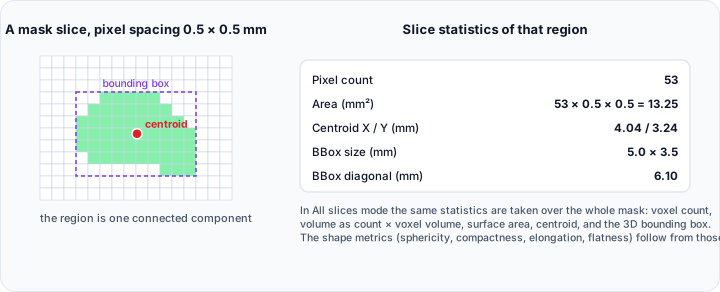
A single slice has no volume, so Voxel count becomes Pixel count, Volume (mm³) becomes Area (mm²), and Volume fraction (%) becomes Area fraction (%).
Histogram Settings
| Control | Description |
|---|---|
| Number of bins | Number of histogram bins (10–100,000, default: 128) |
Output Tables
| Table | Description |
|---|---|
| Information | Context rows in a Name and Value pair of columns: the analysed Volume, the Mask, and the Slice. In a slice mode the slice index is appended in brackets |
| Statistics | The selected statistics for the analysed mask, also as Name and Value rows |
| Individual visible mask statistics | One row per mask, with #, Volume, Mask, and Slice columns followed by one column per selected statistic. Shown only when the target is Visible masks |
Toolbar
| Button | Description |
|---|---|
| Select statistics: ... | Open the dialog to select which statistics to compute |
| Export... | Export results to PDF or CSV |
Per-Region Mask Statistics
Analyze connected regions (components) within a mask with region-by-region statistics.
Description
Automatically detects and labels connected regions within a binary mask, then computes statistics for each individual region. Includes descriptive statistics summarizing all regions.
Target
This tool always analyses the active mask, so there is no target selection. Activate the mask you want in the scene tree before opening it.
Histogram Chart
The distribution of the target metric is drawn in the Interactive Histogram Chart. Right-click the chart to reach its display options, its interval actions, and its export actions.
| Control | Description |
|---|---|
| Number of bins | Histogram resolution (2–100,000, default: 10) |
| Scale | In the chart context menu: linear or logarithmic frequency axis |
The number of bins is a setting of this tool, because it controls how the region values are grouped in the histogram, so the chart does not offer a second bin count of its own. The frequencies stay counts of regions.
Output Tables
This tool produces three separate results tables:
| Table | Description |
|---|---|
| Individual region statistics | Individual statistics for each connected region |
| Overall descriptive statistics | Minimum, Maximum, Mean, and Standard deviation across all regions for each metric |
| Whole mask statistics | Statistics computed for the entire mask (all regions combined) |
Region Table Columns
The table starts with a Region column, followed by one column for each statistic selected with Select statistics: ..., and ends with an Annotation column. The statistic columns carry the exact names listed under Available Statistics, for example:
- Region: Identifier of the connected region
- Voxel count: Number of voxels in the region
- Volume (mm³): Physical volume
- Surface area (mm²): Boundary surface area
- Centroid X (mm) / Centroid Y (mm) / Centroid Z (mm): Center of mass position
- Intensity statistics: Min. gray value, Max. gray value, Mean gray value, Median gray value, Std. dev. of gray values
- Shape metrics: Sphericity, Compactness, Elongation, Flatness
- Annotation: Text attached to the region
Annotation Feature
Each region can be annotated with a text label that appears in the 3D and slice views.
| Control | Description |
|---|---|
| Show interactive annotation | When enabled, clicking a row in the statistics table (or picking in the 3D view) shows an annotation at the selected region's first voxel position in all views. |
| Copy Annotation to Measurement | Copy the annotation of the selected region into the Measurements tool. |
The Show all labels annotations control and its view selector belong to the Per-Label tool and are not shown here.
Toolbar
| Button | Description |
|---|---|
| Select statistics: ... | Select which statistics to compute |
| Export... | Export results to PDF or CSV |
Per-Label Mask Statistics
Analyze multi-label segmentation masks with label-by-label statistics.
Description
Computes statistics for each unique label value in a multi-label mask. Ideal for analyzing AI segmentation results where different structures have different label values.
Target
This tool always analyses the active mask, so there is no target selection. Activate the multi-label mask you want in the scene tree before opening it.
Label Display
Each row of the label table shows the numeric label value together with a swatch of the label's current colour. Any annotation stored with the label appears in the Annotation column.
Histogram Chart
The distribution of the target metric is drawn in the Interactive Histogram Chart. When Bars and From Color Bar are selected, the bars carry the colors of the selected lookup table, so the chart and the labels in the 3D view can be read together. Right-click the chart to reach its display options, its interval actions, and its export actions.
| Control | Description |
|---|---|
| Number of bins | Histogram resolution (2–100,000, default: 10) |
| Scale | In the chart context menu: linear or logarithmic frequency axis |
The number of bins is a setting of this tool, because it controls how the label values are grouped in the histogram, so the chart does not offer a second bin count of its own. The frequencies stay counts of labels.
Output Tables
This tool produces three separate results tables:
| Table | Description |
|---|---|
| Individual label statistics | Individual statistics for each label value |
| Overall descriptive statistics | Minimum, Maximum, Mean, and Standard deviation across all labels for each metric |
| Whole mask statistics | Statistics for the entire mask (all labels combined) |
Label Table Columns
The table starts with a Label column, followed by one column for each statistic selected with Select statistics: ..., and ends with an Annotation column. The statistic columns carry the exact names listed under Available Statistics, for example:
- Label: The numeric label value, with its colour swatch
- Voxel count: Number of voxels with this label
- Volume (mm³): Physical volume
- Volume fraction (%): Percentage of the total image volume
- All other selected statistics: Same set as the Per-Region analysis
- Annotation: Text attached to the label
Lookup Table
The Lookup table list selects the colour map used to recolour the labels by the selected Target metric, and to colour the histogram bars. The labels are recoloured from the minimum to the maximum value of that metric, so the largest, roundest, or flattest structures stand out at a glance.
If the mask has a valid 3D preview surface, the preview is recoloured with the same colours and a colour scale appears in the 3D view. Without a preview the tables and the histogram are still computed, but the 3D view is not recoloured.
This control is specific to the Per-Label tool; the Per-Region tool does not offer it.
Annotation Feature
Labels can be annotated individually or all at once in the 3D and slice views.
| Control | Description |
|---|---|
| Show interactive annotation | When enabled, clicking a row in the statistics table (or picking in the 3D view) shows an annotation at the selected label's first voxel position in all views. |
| Show all labels annotations | When enabled, annotations for all labels are shown simultaneously, each positioned at the label's first voxel and automatically repositioned to avoid overlap. Use the adjacent drop-down to select 3D View (annotations appear only in the 3D viewport) or All Views (annotations appear in 3D and 2D slice views). No 3D surface preview is required. |
| Copy Annotation to Measurement | Copy the annotation of the selected label into the Measurements tool. |
The annotation state (enabled/disabled and selected view) is recorded in the PDF report settings summary.
Toolbar
| Button | Description |
|---|---|
| Select statistics: ... | Select which statistics to compute |
| Export... | Export results to PDF or CSV |
Per-Region and Per-Label Mask 3D Preview Statistics
The two 3D Preview entries measure the mask's generated 3D preview surface instead of its voxels. They report mesh properties such as surface area, enclosed volume, triangle and vertex counts, and mesh shape descriptors, which the voxel-based tools cannot provide.
| Entry | Analyses |
|---|---|
| Per-Region Mask 3D Preview Statistics | Each connected region of the active mask's 3D preview model |
| Per-Label Mask 3D Preview Statistics | Each label of the active multi-label mask's 3D preview model |
Both are variants of Per-Region Surface Mesh Statistics (see Surface Statistics), applied to the mask's preview mesh rather than to a surface object, so they share its controls and its statistic set.
These tools measure the preview mesh, so the active mask must have one. Generate it first with View ▸ 3D View ▸ Mask 3D Preview (Mesh) at Optimal quality, or with the quality buttons on the 3D view toolbar. Lower qualities downsample the mask before the surface is generated, which changes every measured value.
Target
Both tools always analyse the active mask. Activate it in the scene tree before opening the tool.
Options
| Control | Description |
|---|---|
| Select statistics: ... | Open the dialog to choose which mesh statistics to compute |
| Target metric: | The statistic plotted in the histogram and used to recolour the regions or labels |
| Lookup table: | Colour map applied to the target metric |
| Number of bins: | Histogram resolution (2–100,000, default: 10) |
Output Tables
| Table | Description |
|---|---|
| Individual region statistics / Individual label statistics | One row per region or label |
| Overall descriptive statistics | Minimum, Maximum, Mean, and Standard deviation across all rows |
| Whole mesh statistics | Statistics for the complete preview mesh |
Mesh Statistics
The available measurements are mesh properties rather than voxel properties, for example:
| Statistic | Description |
|---|---|
| Vertex count / Triangle count / Edge count | Mesh size |
| Volume (mm³) / Volume fraction (%) | Enclosed volume, for watertight meshes |
| Surface area (mm²) / Surface area fraction (%) | Mesh surface area |
| Surface area to volume ratio (mm⁻¹) | Ratio of surface area to enclosed volume |
| Sphericity / Compactness / Shape index | Shape descriptors |
| Diameter (mm) | Largest distance between any two vertices |
| Centroid X/Y/Z (mm) | Centre of mass |
| BBox measurements | Bounding box area, volume, diagonal, size, centre, and bounds |
| Connected regions count, Boundary edges count, Non-manifold edges count | Connectivity |
| Euler characteristic / Genus | Topology |
| Vertex valence and edge length statistics | Minimum, maximum, mean, and standard deviation |
Annotation and Export
| Control | Description |
|---|---|
| Show annotation | Show an annotation for the selected region or label in the views |
| Copy Annotation to Measurement | Copy the annotation into the Measurements tool |
| Export... | Export the statistics and histogram to PDF or CSV |
Available Statistics
All mask statistics tools can compute the following measurements. Click the ... button next to Select statistics: to choose which ones to include.
The names below are exactly the ones shown in the selection dialog and used as the table column headers.
Computed by Default
Nine statistics are selected when a tool is opened for the first time:
| Statistic | Description |
|---|---|
| Voxel count | Number of voxels in the region or label |
| Volume (mm³) | Physical volume |
| Volume fraction (%) | Volume relative to the total image volume |
| Surface area (mm²) | Surface area of the region boundary |
| Min. gray value | Minimum voxel gray value |
| Max. gray value | Maximum voxel gray value |
| Mean gray value | Mean gray value across all voxels |
| Median gray value | Median gray value |
| Std. dev. of gray values | Standard deviation of the gray values |
Size and Shape
| Statistic | Description |
|---|---|
| Equivalent diameter (mm) | Diameter of the sphere with the same volume |
| Equivalent ellipsoid diameter (mm) | Size of the ellipsoid with the same size and axis ratios |
| Circumsphere diameter (mm) | Diameter of the circumscribed sphere |
| Gap (sphere) (mm) | Distance to the other regions, measured between circumscribed spheres |
| Equivalent spherical surface area (mm²) | Surface area of the sphere with the same volume |
| Border voxel count | Number of voxels lying on the image border |
| Surface area on border (mm²) | Surface area lying on the image border |
| Sphericity | How close the shape is to a sphere. 1.0 is a perfect sphere |
| Compactness | Region volume divided by the volume of its bounding sphere |
| Elongation | Square root of the ratio of the second largest to the second smallest principal moment |
| Flatness | Square root of the ratio of the second smallest to the smallest principal moment. 0 is a flat structure |
| Shape factor | Elongation divided by Flatness |
| Diameter X (mm) / Diameter Y (mm) / Diameter Z (mm) | Size of the oriented bounding box along each of its axes |
Position and Orientation
| Statistic | Description |
|---|---|
| Centroid X (mm) / Centroid Y (mm) / Centroid Z (mm) | Centre of mass position |
| Orientation angle to X-axis (deg) | Roll of the oriented bounding box about the global X axis |
| Orientation angle to Y-axis (deg) | Pitch of the oriented bounding box about the global Y axis |
| Orientation angle to Z-axis (deg) | Yaw of the oriented bounding box about the global Z axis |
| PCA deviation 1 / 2 / 3 | Standard deviation along the first, second, and third principal component axes |
| PCA max. deviation ratio | Maximum principal deviation relative to the circumsphere radius |
| PCA min. deviation ratio | Minimum principal deviation relative to the circumsphere radius |
| Projected size X (mm) / Y (mm) / Z (mm) | Maximum extent when projected onto the YZ, XZ, and XY plane |
| Projected area YZ (mm²) / XZ (mm²) / XY (mm²) | Area when projected onto each plane |
Gray Value Percentiles
| Statistic | Description |
|---|---|
| 5% quantile value | Gray value below which 5% of the voxels fall |
| 25% quantile value | First quartile |
| 50% quantile value | Median |
| 75% quantile value | Third quartile |
| 95% quantile value | Gray value below which 95% of the voxels fall |
A few measurements exist in the data model but are deliberately kept out of the selection dialog, either because they are internal or because they are too slow to compute. These include Feret diameter, the oriented bounding box origin, the principal moments and principal axes, the bounding box indices, and the raw histogram arrays.
When Whole Mask/Slice Statistics analyses individual slices instead of the whole mask, the three volumetric statistics are reported per slice and renamed accordingly: Voxel count becomes Pixel count, Volume (mm³) becomes Area (mm²), and Volume fraction (%) becomes Area fraction (%).
Overall Descriptive Statistics Table
For the Per-Region and Per-Label tools, the Overall descriptive statistics table summarizes all regions or labels:
| Column | Description |
|---|---|
| Metric | Name of the measured statistic |
| Minimum | Minimum value across all regions or labels |
| Maximum | Maximum value across all regions or labels |
| Mean | Average value across all regions or labels |
| Standard deviation | Standard deviation across all regions or labels |
This table helps identify:
- Range of values (Minimum to Maximum)
- Typical values (Mean)
- Variation in the data (Standard deviation)
Export Options
All statistics can be exported via the toolbar:
| Format | Description |
|---|---|
| PDF Report | Complete report with tables, charts, and optional 3D scene |
| CSV | Comma-separated values for spreadsheet import |
PDF Report Contents
When exporting to PDF, you can include:
- Analysis metadata and settings summary
- Requested metrics list
- All statistics tables
- Histogram visualizations
- Histogram data tables (per selected metric)
- 3D scene with labeled regions/labels
- Snapshots of views
- Custom header/footer and metadata
A histogram bar counts every label whose value falls within a range, not at a single value. Both the report tables and the CSV therefore state that range in a from and a to column, followed by the number of labels within it.
If the source workflow is Void/Inclusion analysis, the report uses defect-oriented wording (void/inclusion/defect) instead of mask-label terminology.
See PDF Report Generation for detailed export options.
Tips
- Per-Region is best for analyzing individual objects within a single binary mask
- Per-Label is ideal for multi-structure segmentations (e.g., AI segmentation results)
- 3D Preview tools add surface mesh statistics not available in voxel-based analysis
- Use the histogram to identify intensity distribution patterns
- The Overall descriptive statistics table quickly shows the data spread across regions or labels
- Export to Excel for further statistical analysis in spreadsheet software
- Use annotations to mark specific regions/labels of interest in 3D
Related Tools
- Compare Masks — Overlap statistics between two masks
- Volume Statistics — Statistics for volume datasets
- Surface Statistics — Statistics for surface meshes