Volume Similarity Statistics
The Volume Similarity Statistics tool calculates similarity metrics between two volume datasets. This is useful for comparing registered images, evaluating alignment quality, or assessing changes between time points.
Accessing the Tool
- Navigate to the Measure tab in the ribbon
- Click the Volume Similarity Statistics button in the Statistics section
Overview
Calculate similarity statistics between two volume datasets.
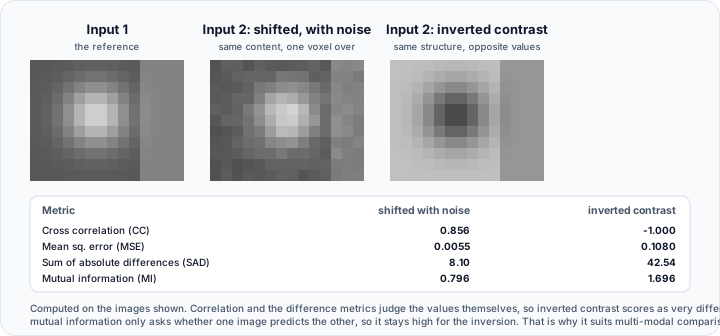
Two volume datasets must be loaded in the project. For meaningful results, volumes should:
- Have the same dimensions and spacing, or be properly registered
- Represent the same anatomical region or structure
- Use compatible intensity scales
User Interface
Description
Displays: "Calculate similarity statistics between two volume datasets."
Volume Objects
| Control | Description |
|---|---|
| Input 1 | Select the first volume dataset for comparison |
| Input 2 | Select the second volume dataset for comparison |
Both dropdowns list all volume datasets in the project.
Similarity Statistics Table
Displays calculated similarity metrics in a name-value table:
| Metric | Description |
|---|---|
| Cross correlation (CC) | Measures linear relationship between intensities |
| Local normalized cross correlation (LNCC) | Locally normalized version of cross correlation |
| Correlation ratio (XY) | Functional dependence of Y on X |
| Correlation ratio (YX) | Functional dependence of X on Y |
| Mutual information (MI) | Information-theoretic similarity measure |
| Normalized mutual information (NMI) | Normalized version of mutual information |
| Kappa statistic (K) | Agreement measure accounting for chance |
| Cosine of normalized gradient field | Structural similarity based on gradients |
| Joint entropy (JE) | Combined entropy of both images |
| Sum of sq. intensity differences (SSID) | Total squared intensity differences |
| Mean sq. error (MSE) | Average squared difference per voxel |
| Sum of absolute differences (SAD) | Total absolute intensity differences |
| Sum of sq. differences (SSD) | Sum of squared differences |
| Covariance | Joint variability measure |
| Peak signal-to-noise ratio (PSNR) | Ratio of signal power to noise power |
| Label consistency (LC) | Agreement between discrete labels |
Toolbar
| Button | Description |
|---|---|
| Export... | Export statistics to a file |
| Update | Recalculate statistics |
Similarity Metrics
Correlation-Based Metrics
| Metric | Range | Interpretation |
|---|---|---|
| Cross Correlation (CC) | -1 to 1 | 1 = perfect positive correlation |
| LNCC | -1 to 1 | Robust to intensity variations |
| Correlation Ratio | 0 to 1 | 1 = perfect functional dependence |
Information-Theoretic Metrics
| Metric | Range | Interpretation |
|---|---|---|
| Mutual Information (MI) | ≥ 0 | Higher = more shared information |
| Normalized MI (NMI) | 0 to 2 | Normalized for comparison |
| Joint Entropy (JE) | ≥ 0 | Lower = more similar |
Difference-Based Metrics
| Metric | Range | Interpretation |
|---|---|---|
| MSE | ≥ 0 | 0 = identical images |
| SAD | ≥ 0 | 0 = identical images |
| SSD | ≥ 0 | 0 = identical images |
| PSNR | dB scale | Higher = more similar |
- Cross Correlation (CC): Best for images with linear intensity relationships
- Mutual Information (MI): Robust for multi-modal image comparison (e.g., CT vs MRI)
- MSE/PSNR: Simple metrics suitable for images with similar intensity ranges
- Normalized metrics: Preferred when comparing images with different intensity scales
Workflow
Basic Comparison
- Ensure at least two volume datasets are loaded
- Open the Volume Similarity Statistics tool
- Select Input 1 from the first dropdown
- Select Input 2 from the second dropdown
- Click Update to calculate statistics
- Review the similarity metrics in the table
Registration Quality Assessment
- Perform image registration between two volumes
- Open the Volume Similarity Statistics tool
- Compare the registered volume with the reference
- Higher correlation and MI values indicate better alignment
Change Detection
- Load baseline and follow-up volumes
- Calculate similarity statistics
- Lower similarity values may indicate changes between acquisitions
Export
Click Export... to save the similarity statistics to a file for documentation or further analysis.
Use Cases
Registration Validation
Verify that image registration achieved good alignment by checking correlation and mutual information values.
Quality Control
Compare acquired images against reference standards to ensure imaging consistency.
Longitudinal Studies
Quantify changes between time points by tracking similarity metrics over time.
Algorithm Comparison
Evaluate different processing algorithms by comparing their outputs to a reference.
Technical Notes
- Both volumes should have the same dimensions for accurate comparison
- Volumes are compared voxel-by-voxel based on spatial correspondence
- For unregistered volumes, consider performing registration first
- Some metrics (CC, LNCC) are more robust to intensity scaling differences
Related Tools
- Volume Statistics — Statistics for a single volume
- Compare Masks — Overlap statistics between masks