Compare Masks
The Compare Masks tool calculates overlap statistics between two mask objects. This is useful for evaluating segmentation accuracy, comparing different segmentation methods, or assessing inter-observer variability.
Accessing the Tool
- Navigate to the Measure tab in the ribbon
- Click the Compare Masks button in the Statistics section
Overview
Compare the overlap and differences between two masks using statistical measures.
User Interface
Description
The description panel explains the available metrics:
-
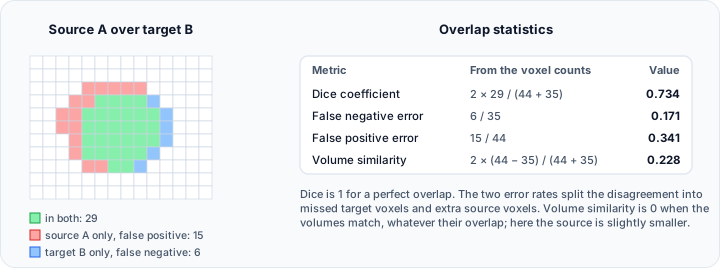
Dice coefficient (0 to 1): Measures spatial overlap by computing twice the intersection volume divided by the sum of both mask volumes. A value of 0 indicates no overlap, while 1 represents perfect overlap.
-
False negative error (0 to 1): Represents the proportion of target mask voxels that are missing in the source mask (under-segmentation). A value of 0 means no missing voxels, while 1 means all target voxels are missing.
-
False positive error (0 to 1): Represents the proportion of voxels present in the source mask but absent in the target mask (over-segmentation). A value of 0 means no extra voxels, while 1 means all source voxels are extra.
-
Volume similarity (-2 to 2): Measures the relative volume difference between the source and target masks. A value of 0 indicates identical volumes, while values approaching -2 or 2 indicate extreme volume differences.
Mask Objects
| Control | Description |
|---|---|
| Source | Select the first mask (typically the test segmentation) |
| Target | Select the second mask (typically the reference/ground truth) |
Overlap Statistics Table
Displays the calculated overlap metrics:
| Metric | Range | Interpretation |
|---|---|---|
| Dice coefficient | 0–1 | 1 = perfect overlap |
| False negative error | 0–1 | 0 = no under-segmentation |
| False positive error | 0–1 | 0 = no over-segmentation |
| Volume similarity | -2 to 2 | 0 = identical volumes |
Individual Label Overlap Statistics
For multi-label masks, this table shows overlap statistics calculated separately for each label value present in both masks.
| Column | Description |
|---|---|
| Source Mask | Name of source mask |
| Target Mask | Name of target mask |
| Label | Label value |
| Dice coefficient | Per-label Dice score |
| False negative error | Per-label false negative |
| False positive error | Per-label false positive |
| Volume similarity | Per-label volume similarity |
Toolbar
| Button | Description |
|---|---|
| Export... | Export statistics to a file |
| Update | Recalculate statistics |
Metrics Explained
Dice Coefficient
The Dice coefficient (also known as Dice Similarity Coefficient or F1 score) measures the overlap between two segmentations:
Where:
- is the intersection volume (voxels in both masks)
- and are the volumes of each mask
Interpretation:
- 1.0 = Perfect overlap
- 0.8–1.0 = Excellent agreement
- 0.6–0.8 = Good agreement
- < 0.6 = Poor agreement
False Negative Error
Measures under-segmentation—how much of the target is missed by the source:
Where is the volume in target but not in source.
False Positive Error
Measures over-segmentation—how much extra volume the source includes:
Where is the volume in source but not in target.
Volume Similarity
Measures relative volume difference:
Workflow
Basic Comparison
- Ensure at least two masks exist in the project
- Open the Compare Masks tool
- Select Source mask (test segmentation)
- Select Target mask (reference/ground truth)
- Click Update to calculate statistics
- Review overlap metrics in the table
Multi-Label Comparison
- Create or load multi-label masks
- Open the Compare Masks tool
- Select source and target masks
- View overall statistics and per-label breakdown
- Identify which labels have good/poor agreement
Use Cases
Segmentation Validation
Compare automated segmentation results against manual ground truth to evaluate algorithm performance.
Inter-Observer Variability
Compare segmentations created by different operators to assess consistency.
Algorithm Comparison
Compare results from different segmentation algorithms on the same data.
Longitudinal Analysis
Compare segmentations from different time points after registration.
Export
Click Export... to save comparison statistics to a file for reporting or further analysis.
Related Tools
- Mask Statistics — Statistics for individual masks
- Volume Similarity Statistics — Similarity between volumes