Surface Statistics
The Surface Statistics button provides access to surface mesh analysis tools through a dropdown menu. These tools calculate geometric and topological statistics for surface mesh objects.
Accessing the Tools
- Navigate to the Measure tab in the ribbon
- Click the Surface Statistics dropdown button in the Statistics section
- Select one of the available options
Available Tools
Whole Surface Mesh Statistics
Calculate statistics for the active or all visible surfaces. Select an individual triangle in the 3D view to inspect its properties.
Options
| Control | Description |
|---|---|
| Target | Select the analysis target |
| Select statistics | Open dialog to choose which statistics to calculate |
Target Options
| Option | Description |
|---|---|
| Active surface object | Calculate statistics for the active surface |
| Visible surface object(s) | Calculate statistics for all visible surfaces |
| Triangle selection | Calculate statistics for a selected triangle in the 3D view |
Left-click on the surface in the 3D view to select a triangle. Hold the Alt key to enable spinning, zooming, and panning while in selection mode.
Output Tables
| Table | Description |
|---|---|
| Statistics | Calculated statistics for the target |
| Individual visible surface statistics | Per-surface breakdown when multiple surfaces are visible |
Per-Region Surface Mesh Statistics
This tool calculates and displays statistics for the connected regions within the active surface. Each region is presented with its associated statistics, 3D visualization, and a histogram of the target metric.
Connected regions are spatially separate parts of a surface mesh that are not connected by shared edges or vertices.
Options
| Control | Description |
|---|---|
| Select statistics | Open dialog to choose which statistics to calculate |
| Target metric | Select the metric for histogram analysis |
| Lookup table | Color lookup table for visualization |
Histogram Chart
The distribution of the target metric is drawn in the Interactive Histogram Chart. When Bars and From Color Bar are selected, the bars carry the colors of the selected lookup table, so the chart and the 3D view can be read together. Right-click the chart to reach its display options, its interval actions, and its export actions.
| Control | Description |
|---|---|
| Number of bins | Total bins for the histogram (2–100,000, default: 10) |
| Scale | In the chart context menu: linear or logarithmic frequency axis |
The number of bins is a setting of this tool, because it controls how the region values are grouped in the histogram, so the chart does not offer a second bin count of its own. The frequencies stay counts of regions.
Drag across the chart to mark a range of metric values. The marked range reports its borders, mean, standard deviation, total, and share of the regions.
Output Tables
| Table | Description |
|---|---|
| Individual region statistics | Per-region statistics breakdown |
| Overall descriptive statistics | Summary statistics across all regions |
| Whole mesh statistics | Combined statistics for the entire mesh |
Annotation
| Control | Description |
|---|---|
| Show annotation | Display annotations in the 3D view at region centroid or picked position |
| Copy Annotation to Measurement | Convert annotation to a measurement object |
Annotation Behavior:
- If Centroid X, Y, and Z statistics are selected, the annotation anchor aligns with the region centroid
- If centroid statistics are not selected, the picked position determines the anchor point
Available Statistics
The names below are exactly the ones shown in the selection dialog and used as the table column headers.
Size Statistics
- Surface area (mm²) and Surface area fraction (%)
- Volume (mm³) and Volume fraction (%), computed for watertight meshes
- Surface area to volume ratio (mm⁻¹)
- Diameter (mm), the largest distance between any two vertices
- Centroid X (mm), Centroid Y (mm), Centroid Z (mm)
- BBox area (mm²), BBox volume (mm³), BBox diagonal length (mm), BBox size X/Y/Z (mm), BBox center X/Y/Z (mm), and BBox bounds
Shape Metrics
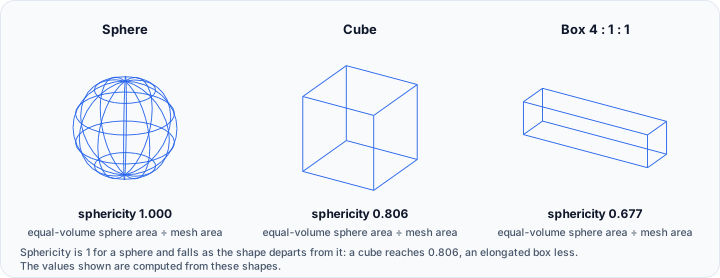
- Sphericity, the surface area of the equal-volume sphere divided by the mesh surface area. 1.0 is a perfect sphere
- Compactness
- Shape index
Counts and Topology
- Vertex count, Triangle count, Edge count, and Estimated edge count
- Connected regions count
- Boundary edges count and Non-manifold edges count
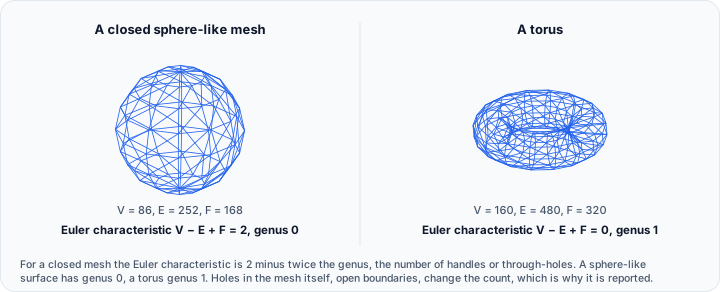
- Euler characteristic and Genus

Distribution Statistics
Each of these is reported as a minimum, maximum, mean, and standard deviation:
- Vertex valence
- Edge length (mm) and Min edge length (mm)
- Angle (deg), Min angle (deg), Max angle (deg), and Dihedral angle (deg)
- Triangle area (mm²)
- Edge ratio and Radius ratio

Workflow
Basic Surface Analysis
- Select a surface mesh object or make it visible
- Open Surface Statistics > Whole Surface Mesh Statistics
- Select the target (Active surface or Visible surfaces)
- Click Select statistics to choose metrics
- View results in the statistics table
Per-Region Analysis
- Open Surface Statistics > Per-Region Surface Mesh Statistics
- Select a target metric for histogram visualization
- Choose a lookup table for color coding
- Review individual region statistics in the table
- Enable Show annotation to visualize regions in 3D
Export
Click Export... to save statistics and histogram to disk.
A histogram bar counts every region whose metric falls within a range of values, not at a single value. Both the exported file and the report table therefore state that range in a from and a to column, followed by the number of regions within it.
Related Tools
- Volume Mesh Statistics — Statistics for volume meshes
- Mesh Quality Analyzer — Analyze mesh quality metrics
- Mask Statistics — Statistics for mask objects