Flip Mask
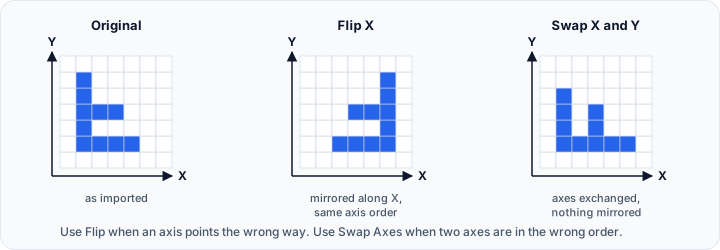
The Flip Mask tool mirrors mask data along one or more axes. Unlike the Flip tool in the Image tab, which always flips every volume and mask in the project, this tool flips only the masks you select.
Accessing the Tool
- Navigate to the Segmentation tab in the ribbon.
- Click Additional in the Operations section.
- Select Flip Mask from the dropdown menu.
Parameters
Target Object(s)
| Option | Description |
|---|---|
| Active mask | Flip the active mask only. |
| Selected masks | Flip all selected masks. |
| Visible masks | Flip all visible masks. |
| All masks | Flip every mask in the project. |
Flip Axes
Select the axes along which to flip the mask. The X, Y, and Z check boxes are independent, so you can combine them and apply the result in a single step.
| Axis | Effect |
|---|---|
| X | Mirrors across the YZ plane (Plane 1) |
| Y | Mirrors across the XZ plane (Plane 2) |
| Z | Mirrors across the XY plane (Plane 3) |
Selecting more than one axis mirrors along each selected axis in a single operation. For example, selecting X and Y gives the same result as flipping along X and then flipping along Y. At least one axis must be selected before applying.
Flip Reference
| Option | Description |
|---|---|
| About origin | Flip using the coordinate system origin (0, 0, 0) as the mirror plane. |
| About center | Flip using the mask's geometric center as the mirror plane. |
Workflow
- Open the Flip Mask tool from the Segmentation tab.
- Select the Target Object(s).
- Select one or more axes to flip along (X, Y, Z).
- Choose the flip reference (About origin or About center).
- Click Apply to flip the masks.
Use Cases
- Correcting the orientation of an imported mask.
- Creating a mirrored copy of an anatomical structure for left/right comparison.
- Matching a mask to the orientation of another dataset.
Flipping changes the spatial relationship between the mask and the underlying volume. Use the Flip tool in the Image tab if the volume must stay aligned with the mask.
Scripting
This operation is available via the Python scripting API using flip().
import ScriptingApi as api

app = api.Application()
mask_operations = app.get_mask_operations()

# Flip along the X axis about the origin
mask_operations.flip(
    ["Mask1"],
    True,   # flip_x
    False,  # flip_y
    False,  # flip_z
    True    # about_origin: True=origin, False=center
)

# Flip along the X and Y axes about the center
mask_operations.flip(["Mask1"], True, True, False, False)
At least one axis must be selected, otherwise the call raises an error.
See the MaskOperations API Reference for details.
See Also
- Flip: flip every volume and mask in the project.
- Manipulate Mask: move, rotate, and scale masks.
- Additional Operations: other operations in the Additional menu.
- Segmentation Tab Overview: overview of all segmentation tools.