Boolean Operations
The Boolean tool combines two or more mask objects using set operations. Create unions, intersections, or differences to merge masks, find overlapping regions, or subtract one mask from another.
Accessing the Tool
- Navigate to the Segmentation tab in the ribbon.
- Click Boolean in the Operations section.
Boolean Operations
Union (A ∪ B)
Combines all voxels from both masks. The result includes any voxel that exists in either mask.
Result = Input A OR Input B
Intersection (A ∩ B)
Keeps only voxels that exist in both masks. The result includes only overlapping regions.
Result = Input A AND Input B
Difference (A ∖ B)
Removes voxels of Input B from Input A. The result includes voxels that exist in A but not in B.
Result = Input A AND NOT Input B
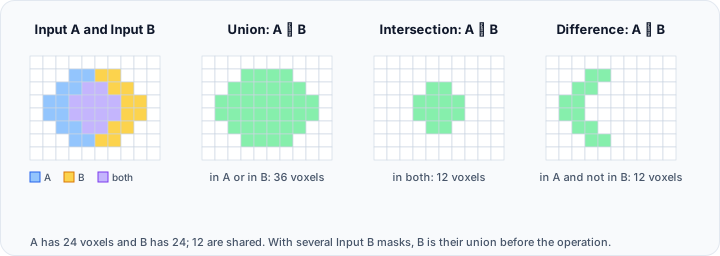
Parameters
Inputs
| Parameter | Description |
|---|---|
| Input A | The first (primary) mask object. |
| Input B | The second mask object(s). Multiple masks can be selected. |
| Result | Target mask for the operation result. |
Operation Type
Select from:
- Union
- Intersection
- Difference
Workflow
- Open the Boolean tool from the Segmentation tab.
- Select Input A (the primary mask).
- Select Input B (the secondary mask or masks).
- Choose the Boolean Operation type.
- Select or name the Result mask.
- Click Apply to perform the operation.
Visual Examples
Union
A:  ████░░░░    B:  ░░░░████    Result: ████████
    ████░░░░        ░░░░████            ████████
Intersection
A:  ██████░░    B:  ░░██████    Result: ░░████░░
    ██████░░        ░░██████            ░░████░░
Difference (A - B)
A:  ██████░░    B:  ░░██████    Result: ██░░░░░░
    ██████░░        ░░██████            ██░░░░░░
Use Cases
- Combining Structures: Merge multiple masks into a single object using Union.
- Finding Overlap: Identify regions where two masks intersect using Intersection.
- Excluding Regions: Remove one structure from another using Difference.
- Creating Margins: Subtract the original mask from a dilated version to create a margin.
Multi-Mask Operations
When multiple masks are selected for Input B:
- Union: Result = A ∪ B₁ ∪ B₂ ∪ ... ∪ Bₙ
- Intersection: Result = A ∩ (B₁ ∪ B₂ ∪ ... ∪ Bₙ)
- Difference: Result = A ∖ (B₁ ∪ B₂ ∪ ... ∪ Bₙ)
Scripting
Boolean operations are available via the Python scripting API:
import ScriptingApi as api

app = api.Application()
mask_operations = app.get_mask_operations()

# Union of two masks
result_mask = mask_operations.boolean(
    "Mask_A",
    ["Mask_B"],
    "",
    api.BooleanOperation.Union,
    True
)
See the MaskOperations API Reference for details.
See Also
- Multi-label Mask: merge masks into multi-label format.
- Split Mask: separate disconnected regions.
- Segmentation Tab Overview: overview of all segmentation tools.