Segmentation Tab Overview
The Segmentation tab contains tools for working with 3D mask objects. Use this tab to create masks from volume data using various segmentation techniques, edit and refine mask boundaries, combine masks with Boolean operations, and convert masks to other data types such as surfaces and volume meshes.
Segmentation results should be reviewed and validated by qualified professionals. The tools in this tab are intended to assist in the segmentation process but are not a substitute for expert judgment, particularly in clinical or diagnostic applications.
Tab Sections
The Segmentation tab is organized into the following sections:
General
Tools for configuring mask visualization:
- Render Properties: Adjust visualization settings for the active mask, including color, opacity, and rendering mode.
Create Mask
Segmentation tools for generating mask objects from volume data:
- New Mask: Create a blank mask object with a specified name and color.
- Threshold: Segment voxels within a defined intensity range.
- Surface Determination: Place the material surface with a manual isovalue, ISO50, a histogram method or advanced local refinement, and store it with sub-voxel accuracy.
- Region Grow: Segment connected regions within an existing mask.
- Dynamic Region Grow: Expand mask regions based on grayscale connectivity from a seed point.
- Multilevel Thresholding: Automatically generate multiple masks using Otsu's multilevel thresholding.
- Watershed: Separate touching objects using watershed segmentation.
- Voids and Inclusions: Detect internal voids or inclusions within objects.
- Additional: LiveWire, which traces object boundaries using semi-automatic edge detection, and GrowCut, which segments regions using seed-based cellular automata.
Operations
Tools for editing and refining mask objects:
- Crop Mask: Remove mask regions outside a defined bounding box.
- Edit Mask: Modify mask data using 2D drawing tools and brushes.
- 3D Editor: Edit visible masks directly in the 3D view.
- Boolean: Combine masks using union, intersection, or difference operations.
- Smooth Mask: Apply smoothing filters (discrete gaussian, recursive gaussian, mean, median) to refine mask borders.
- Multi-label Mask: Merge masks into multi-label masks, create separate masks from labels, convert to normal masks, or edit labels.
- Split Mask: Separate disconnected regions into individual mask objects.
- Filter Regions: Remove small or large regions based on size criteria.
- Refine Mask: Clean up masks by removing artifacts and filling small holes.
- Cavity Fill: Fill internal cavities within masks.
- Manipulate Mask: Hollow, grow, or shrink mask boundaries.
- Interpolate 3D: Fill gaps between segmented slices using 3D interpolation.
- Binarize: Convert masks to binary format.
- Additional: Access additional operations including Partial Volume Calculation, Invert, Fill Holes, and Flip.
Convert
Tools for converting masks to other data types:
- Mask To Volume: Convert masks back to grayscale volume objects.
- Mask To Surface: Generate triangle mesh surfaces from masks using marching cubes.
- Mask To Volume Mesh: Create tetrahedral volume meshes from masks for simulation.
Choosing a Tool
Every tool listed above has parameters that change what it can reach, so these are starting points rather than rules. Each tool has its own page.
Starting from a volume
- One intensity range separates the structure: Threshold, or Surface Determination for a single isovalue and for the material surface of CT volumes.
- Several intensity classes at once: Multilevel Thresholding.
- A connected region you can click a point inside: Dynamic Region Grow, which works on the grayscale volume.
- Competing regions you can mark with seeds: GrowCut, which needs at least two seed labels. They can be in one mask or several.
- A boundary you want to trace on slices: LiveWire.
- Internal voids or inclusions: Voids and Inclusions.
- A structure a pretrained AI model covers: AI Segmentation, on Advanced > Artificial Intelligence.
Changing a mask you already have
- Extract one connected piece from a seed point: Region Grow.
- Separate objects that touch: Watershed.
- Put every disconnected piece into its own mask: Split Mask.
- Remove pieces that are too small or too large: Filter Regions.
- Close internal cavities: Cavity Fill.
- Fill the gaps between segmented slices: Interpolate 3D.
- Correct it by hand: Edit Mask, or the 3D Editor in the 3D view.
Region Grow and Watershed sit in the Create Mask section of the ribbon even though both operate on an existing mask. Dynamic Region Grow, despite the similar name, works on the grayscale volume instead.
Common Concepts
Target Objects
Many tools allow you to select which mask objects the operation applies to:
| Option | Description |
|---|---|
| Active mask object | The currently selected mask in the Scene Tree. |
| Selected mask object(s) | All masks currently selected in the Scene Tree. |
| All mask objects | Every mask in the project. |
| Visible mask object(s) | Only masks currently visible in the views. |
Result Options
Segmentation operations typically provide result options:
| Option | Description |
|---|---|
| Replace | Overwrite the existing mask with the new segmentation. |
| Merge | Add the new segmentation to the existing mask. |
| New Mask | Create a new mask object from the segmentation result. |
Connectivity
Region-based operations use connectivity to determine which voxels are considered neighbors:
| Connectivity | Description |
|---|---|
| 6-connected | Voxels sharing a face are neighbors. |
| 26-connected | Voxels sharing a face, edge, or corner are neighbors. |

Use 6-connectivity for conservative segmentation that follows strict object boundaries. Use 26-connectivity when segmenting objects with thin connections or rough boundaries.
Partial Volume Effects
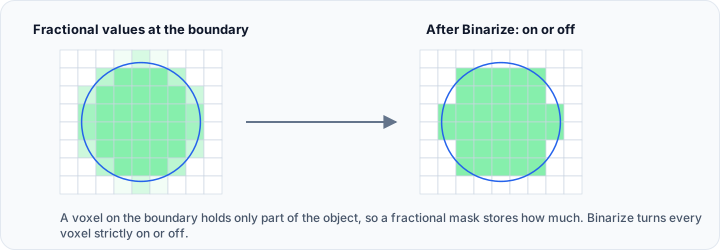
Voxels at object boundaries may partially contain the object of interest, known as partial volume effects. Some masks store fractional values (0–255 or 0–65535) to represent the degree of object presence at boundaries. The Binarize tool converts these to strictly on/off values.
Workflow Examples
Basic Thresholding Workflow
- Load your volume data.
- Open the Threshold tool from the Segmentation tab.
- Adjust the lower and upper threshold values using the histogram or by entering specific values.
- Optionally use the Profile Line tool to analyze intensity values along a path.
- Click Apply to create the mask.
Refining a Segmentation
- Create an initial segmentation using Threshold or another method.
- Use Smooth Mask with appropriate filters (discrete gaussian, recursive gaussian, mean, or median) to reduce noise and improve boundary quality.
- Apply Fill Holes or Cavity Fill to close internal gaps.
- Use Filter Regions to remove small disconnected artifacts.
- Manually correct remaining issues with the Edit Mask tool.
Separating Touching Objects
- Segment the combined objects using Threshold.
- Use Watershed to divide the mask into separate regions.
- Alternatively, use Split Mask if objects are already disconnected.
- Review and manually adjust boundaries if needed using Edit Mask.
Converting Masks for 3D Printing or Simulation
- Complete your segmentation and refine the mask.
- Use Mask To Surface to generate a triangle mesh.
- Apply surface smoothing and optimization tools from the Surface tab.
- Export the surface in STL or OBJ format for 3D printing or CAD applications.
- Alternatively, use Mask To Volume Mesh for finite element analysis applications.
See Also
- Understanding Masks: learn the fundamentals of mask objects.
- MaskOperations API Reference: scripting API for mask operations.
- AI Segmentation: automated segmentation using AI frameworks.