Flip
The Flip tool mirrors volume and mask data along one or more axes. Flipping is useful for correcting orientation issues or creating mirrored versions of datasets.
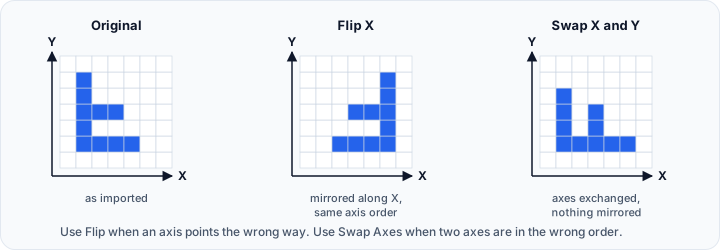
Flip vs Swap Axes
Flip and Swap Axes are related, but they do different things:
- Flip mirrors the data along X, Y, or Z.
- Swap Axes changes which physical direction is treated as X, Y, or Z.
- Use Flip when the axis direction is inverted.
- Use Swap Axes when two axes are in the wrong order.
In short: Flip creates a mirrored result while keeping the same axis order, whereas Swap Axes reorders the axes themselves.
Accessing the Tool
- Navigate to the Image tab in the ribbon.
- Click Flip in the Transform section.
Parameters
Flip Axes
Select the axes along which to flip the data. The X, Y, and Z check boxes are independent, so you can combine them and apply the result in a single step.
| Axis | Effect |
|---|---|
| X | Mirrors across the YZ plane (Plane 1) |
| Y | Mirrors across the XZ plane (Plane 2) |
| Z | Mirrors across the XY plane (Plane 3) |
Selecting more than one axis mirrors along each selected axis in a single operation. For example, selecting X and Y gives the same result as flipping along X and then flipping along Y. At least one axis must be selected before applying.
Flip Reference
Choose the reference point for the flip operation:
| Option | Description |
|---|---|
| About origin | Flip using the coordinate system origin (0, 0, 0) as the mirror plane |
| About center | Flip using the object's geometric center as the mirror plane |
Visual Effect
Flipping creates a mirror image:
- X-axis flip: Left becomes right, right becomes left
- Y-axis flip: Front becomes back, back becomes front
- Z-axis flip: Top becomes bottom, bottom becomes top
Selecting several axes applies each of these effects at the same time.
Workflow
- Open the Flip tool from the Image tab.
- Select one or more axes to flip along (X, Y, Z).
- Choose the flip reference (About origin or About center).
- Click Apply to flip the data.
Use Cases
Correcting Import Orientation
Some data sources may have inverted axes:
- Identify which axes are inverted by comparing to known anatomy.
- Select those axes and apply the flip to correct the orientation.
- Verify the result in orthogonal slice views.
Creating Mirrored Datasets
For bilateral symmetry analysis:
- Flip a left-side dataset to create a right-side version.
- Compare or overlay with actual right-side data.
- Useful for symmetry studies and contralateral comparison.
Matching Coordinate Conventions
Different software may use different coordinate conventions:
- Right-handed vs. left-handed coordinate systems
- Different axis definitions (RAS, LPS, etc.)
- Flip as needed to match target conventions
If the issue is an exchanged axis order rather than an inverted direction, use Swap Axes instead.
Affected Objects
Flipping affects:
- All volume objects
- All mask objects
Both are flipped together to maintain spatial correspondence.
Flipping may cause DICOM orientation metadata to become incorrect. Verify patient orientation labels after flipping medical datasets.
Medical Imaging Considerations
In medical imaging, incorrect left-right orientation can have serious consequences. Always verify anatomical landmarks after flipping to ensure correct patient orientation.
Standard medical imaging conventions:
- R = Patient's Right
- L = Patient's Left
- A = Anterior (front)
- P = Posterior (back)
- S = Superior (head)
- I = Inferior (feet)
Scripting
This operation is available via the Python scripting API using flip().
import ScriptingApi as api

app = api.Application()
volume_operations = app.get_volume_operations()

# Flip along X axis about the origin
volume_operations.flip(
    ["Volume1"],
    True,   # flip_x
    False,  # flip_y
    False,  # flip_z
    True    # about_origin: True=origin, False=center
)

# Flip along Z axis about the center
volume_operations.flip(["Volume1"], False, False, True, False)

# Flip along the X and Y axes in one call
volume_operations.flip(["Volume1"], True, True, False, True)
At least one axis must be selected, otherwise the call raises an error.
See the VolumeOperations API Reference for details.
See also: Swap Axes