Create Primitive
The Create tool generates surface objects from geometric primitives. This tool is useful for creating reference geometries, phantoms for testing, implant designs, or base shapes for further modeling operations.
Accessing the Tool
- Navigate to the Surface tab in the ribbon.
- Click Create in the General section.
Description
Create a surface object from a chosen primitive geometry and add it to the project views. The generated primitive is a triangle mesh that can be further edited, transformed, or used in Boolean operations with other surfaces.
Available Primitives
The following primitive types are available:
| Primitive | Description |
|---|---|
| Box | A rectangular cuboid with configurable width, height, and depth. |
| Sphere | A UV sphere with adjustable radius, rings, and sectors. Optionally create a capped (open) sphere. |
| Ellipsoid | A sphere stretched along X, Y, and Z axes with independent radii. |
| Cylinder | A cylindrical shape with configurable radius, height, resolution, and optional end caps. |
| Capsule | A cylinder with hemispherical end caps. |
| Tube | A hollow cylinder with inner and outer radii (pipe shape). |
| Cone | A conical shape with configurable base radius, height, and optional base cap. |
| Arrow | An arrow shape with shaft and tip dimensions for directional indicators. |
| Torus | A donut-shaped ring with configurable inner and outer radii. |
| Dodecahedron | A 12-faced regular polyhedron. |
| Icosahedron | A 20-faced regular polyhedron. |
| Octahedron | An 8-faced regular polyhedron. |
| Tetrahedron | A 4-faced regular polyhedron (triangular pyramid). |
| Disk | A flat circular shape with optional inner hole (annulus). |
| Plane | A flat rectangular surface. |
| Curve | A tubular surface generated along a user-defined spline path. |
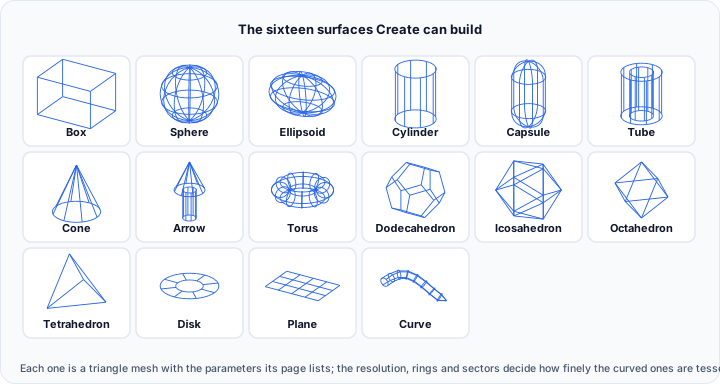
Parameters
Box Parameters
| Parameter | Description |
|---|---|
| Width (mm) | The dimension along the X-axis. |
| Height (mm) | The dimension along the Y-axis. |
| Depth (mm) | The dimension along the Z-axis. |
| Resolution | The number of subdivisions for smoother edges. |
Sphere Parameters
| Parameter | Description |
|---|---|
| Radius (mm) | The radius of the sphere. |
| Rings | Number of horizontal rings from pole to pole (phi resolution). Controls vertical detail. |
| Sectors | Number of vertical slices around the sphere (theta resolution). Controls circumferential detail. |
| Capped sphere | When enabled, creates an open sphere with a flat cap. |
| Cut angle (°) | Controls where the sphere is sliced. 0° = top pole, 90° = hemisphere, 180° = full sphere. |
Ellipsoid Parameters
| Parameter | Description |
|---|---|
| Radius X (mm) | The radius along the X-axis. |
| Radius Y (mm) | The radius along the Y-axis. |
| Radius Z (mm) | The radius along the Z-axis. |
| Rings | Number of horizontal rings. |
| Sectors | Number of vertical sectors. |
Cylinder Parameters
| Parameter | Description |
|---|---|
| Radius (mm) | The radius of the cylinder. |
| Height (mm) | The height (length) of the cylinder. |
| Resolution | Number of sides around the circumference. |
| Direction | Orientation axis: X-axis, Y-axis, or Z-axis. |
| Caps | Enable to close the cylinder ends with flat caps. |
Capsule Parameters
| Parameter | Description |
|---|---|
| Radius (mm) | The radius of the capsule body and hemispherical ends. |
| Height (mm) | The total height including the hemispherical caps. |
| Resolution | Number of sides around the circumference. |
| Direction | Orientation axis: X-axis, Y-axis, or Z-axis. |
Tube Parameters
| Parameter | Description |
|---|---|
| Outer radius (mm) | The outer radius of the tube. |
| Thickness (mm) | The wall thickness (difference between outer and inner radius). |
| Height (mm) | The length of the tube. |
| Resolution | Number of sides around the circumference. |
| Direction | Orientation axis: X-axis, Y-axis, or Z-axis. |
Cone Parameters
| Parameter | Description |
|---|---|
| Radius (mm) | The base radius of the cone. |
| Height (mm) | The height from base to tip. |
| Resolution | Number of sides around the base circumference. |
| Direction | Orientation axis: X-axis, Y-axis, or Z-axis. |
| Caps | Enable to close the cone base with a flat cap. |
Arrow Parameters
| Parameter | Description |
|---|---|
| Total length (mm) | The total length of the arrow (shaft + tip). |
| Shaft radius (mm) | The radius of the arrow shaft. |
| Tip length (mm) | The length of the arrowhead. |
| Tip radius (mm) | The base radius of the arrowhead. |
| Resolution | Number of sides around the circumference. |
| Direction | Orientation axis: X-axis, Y-axis, or Z-axis. |
Torus Parameters
| Parameter | Description |
|---|---|
| Ring radius (mm) | The radius of the tube cross-section. |
| Outer radius (mm) | The distance from the center to the tube center. |
| Resolution | Number of subdivisions for smoothness. |
| Direction | Orientation axis: X-axis, Y-axis, or Z-axis. |
Platonic Solids (Dodecahedron, Icosahedron, Octahedron, Tetrahedron)
| Parameter | Description |
|---|---|
| Radius (mm) | The circumscribed sphere radius. |
Disk Parameters
| Parameter | Description |
|---|---|
| Inner radius (mm) | The inner hole radius (0 for a solid disk). |
| Outer radius (mm) | The outer edge radius. |
| Radial resolution | Number of rings from center to edge. |
| Circum resolution | Number of sectors around the circumference. |
| Direction | Normal direction: X-axis, Y-axis, or Z-axis. |
Plane Parameters
| Parameter | Description |
|---|---|
| Width (mm) | The width of the plane. |
| Height (mm) | The height of the plane. |
| Resolution | Number of subdivisions. |
| Direction | Normal direction: X-axis, Y-axis, or Z-axis. |
Curve Parameters
The Curve primitive creates a tubular surface along a user-defined spline path.
| Parameter | Description |
|---|---|
| Mode | Simple tube: Basic tube with optional varying radius. Thick tube: Tube with defined wall thickness. |
| Vary radius | Enable to interpolate radius along the curve path. |
| Minimum radius (mm) | The starting radius (when varying radius is enabled). |
| Maximum radius (mm) | The ending radius (when varying radius is enabled). |
| Inner radius (mm) | Inner radius for thick tube mode. |
| Outer radius (mm) | Outer radius for thick tube mode. |
| Resolution | Number of sides around the tube circumference. |
Use the curve table to add, edit, and manage control points for the spline path.
Center Position
All primitives can be positioned in 3D space:
| Parameter | Description |
|---|---|
| Center on active volume image | When enabled, the primitive is created at the physical center of the active volume image. Manual X, Y, and Z inputs are disabled. |
| X (mm) | X-coordinate of the primitive center. |
| Y (mm) | Y-coordinate of the primitive center. |
| Z (mm) | Z-coordinate of the primitive center. |
Press the P key while hovering over any object in the 3D view to pick that point as the center position.
The Center on active volume image option applies to primitive creation only. It does not transform an existing surface after it has been created.
If Center on active volume image is enabled, a volume object must be active. If no active volume is available, the primitive is not created.
Workflow: Create a Primitive at the Active Volume Center
- Activate the volume object that should define the placement center.
- Open the Create Primitive tool from the Surface tab.
- Select the required primitive type.
- Configure the primitive-specific dimensions and resolution.
- Enable Center on active volume image.
- Click Create.
The new surface is created directly at the physical center of the active volume image.
Workflow
- Open the Create Primitive tool from the Surface tab.
- Select the desired Primitive shell type from the dropdown.
- Configure the shape-specific Parameters.
- Choose how the primitive should be positioned:
- Enable Center on active volume image to place it at the active volume center.
- Or enter a manual Center position.
- Click Create to generate the surface object.
The new surface object appears in the Scene Tree and is displayed in the views.
Use Cases
Creating Reference Geometry
Generate spheres, cylinders, or other shapes as reference objects for alignment, measurement, or comparative analysis.
Implant Design Foundations
Create primitive shapes as starting points for custom implant designs that can be further refined using Boolean operations and mesh editing tools.
Testing and Validation
Generate known geometries for testing segmentation algorithms, measurement accuracy, or visualization settings.
Educational and Demonstration Purposes
Create simple geometric models for training, demonstrations, or presentations.
Tips
- Increase Resolution or Rings/Sectors for smoother curved surfaces, but be aware this increases triangle count.
- Use Caps options to control whether shapes are open or closed.
- The Curve primitive is useful for creating tubular structures like blood vessels or custom paths.
- Primitive surfaces can be combined using Boolean operations to create complex shapes.
- Enable Center on active volume image when you need a primitive to start aligned with the active image volume.
- Use manual Center position values when placement must be offset from the active volume center.
- After creation, use Transform tools to reposition or resize the primitive as needed.
Troubleshooting
Primitive Is Not Created When Centering on the Volume
- Verify that a volume object is currently active.
- Make sure the active object is a volume, not a surface, mask, or other data type.
- If no active volume is available, disable Center on active volume image and use a manual center instead.