Remesh
The Remesh tool regenerates a surface mesh with improved triangle quality by creating a new, well-structured triangulation that better approximates the original geometry. Unlike simple reduction algorithms that remove triangles, remeshing fundamentally reconstructs the mesh topology to produce more uniform, well-shaped triangles.
Overview
Surface meshes acquired from scanning, segmentation, or CAD import often suffer from poor triangle quality—including elongated slivers, highly irregular sizes, or locally dense regions that add computational cost without improving geometric fidelity. The Remesh tool addresses these issues by generating an entirely new mesh that:
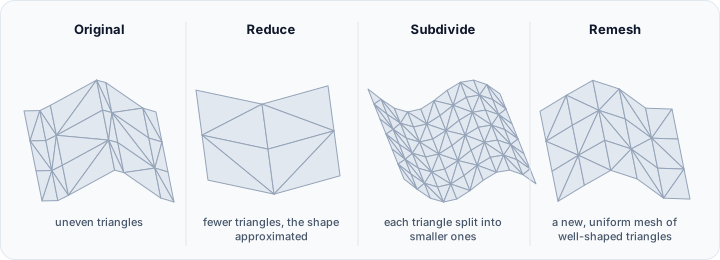
- Improves triangle quality: Creates more equilateral triangles with better aspect ratios
- Optimizes mesh density: Distributes triangles according to geometric complexity
- Preserves geometric features: Maintains sharp edges and detailed regions when needed
- Reduces computation time: Enables faster downstream operations with cleaner mesh topology
Accessing the Tool
Navigate to the Surface ribbon tab and locate Remesh in the Edit section. Select one or more surface objects before activating the tool.
Remeshing Methods
The tool provides two fundamentally different approaches to mesh regeneration:
Adaptive Remeshing
The adaptive method varies triangle density based on local surface curvature. Highly curved regions receive more triangles to capture geometric detail, while flat areas use fewer, larger triangles to reduce overall mesh complexity.
This curvature-adaptive approach is particularly effective for organic shapes, anatomical structures, and any geometry where surface complexity varies significantly across the model. The algorithm automatically detects where detail is needed and allocates mesh resources accordingly.
Best suited for:
- Anatomical models with varying curvature
- Organic surfaces with both smooth and detailed regions
- Optimizing meshes for 3D printing or simulation
- Reducing file size while preserving important features
Regular Remeshing
The regular method creates a more uniform triangulation with consistent triangle sizes across the entire surface. This approach prioritizes mesh uniformity over geometric adaptation, producing evenly-distributed triangles regardless of local curvature.
Regular remeshing is ideal when downstream applications require consistent mesh density, such as finite element analysis where element size uniformity affects solution quality.
Best suited for:
- Finite element analysis preprocessing
- Texture mapping with uniform UV distribution
- Meshes requiring consistent triangle sizes
- Industrial or mechanical parts with uniform detail
Quality Settings
The quality parameter controls the fidelity of the remeshed surface relative to the original geometry:
| Quality Level | Description |
|---|---|
| Medium | Balances speed and accuracy; suitable for visualization and general use |
| High | Improved geometric preservation; recommended for most applications |
| Maximum | Highest fidelity to original surface; use when accuracy is critical |
Higher quality settings increase processing time but produce meshes that more closely approximate the original geometry, particularly in regions of high curvature or fine detail.
Density Control
The Density parameter (11% to 100%) controls the overall mesh resolution relative to an automatically determined baseline:
- Lower values (11-30%): Significant triangle reduction; faster processing and smaller files
- Medium values (30-70%): Balanced approach for general-purpose use
- Higher values (70-100%): Denser mesh with more geometric detail preservation
The density setting works in conjunction with the remeshing method. For adaptive remeshing, density affects the baseline from which curvature-based adjustments are made. For regular remeshing, density directly controls the uniform triangle size.
Edge Preservation
Enable Preserve edges to keep both the surface's open boundaries (holes) and its sharp feature edges intact during remeshing. When activated, the algorithm detects and preserves geometric discontinuities such as:
- Sharp corners and crease/ridge edges
- Boundary edges of open surfaces (holes)
- Feature lines that define the object's character
This option is essential for mechanical parts, architectural models, or any geometry where crisp edges define the design intent. Without edge preservation, remeshing may round off sharp corners or blend distinct surfaces together. Note that preserving edges can produce less uniformly shaped triangles in the areas immediately surrounding the preserved edges.
Workflow Recommendations
Preparing for 3D Printing
For 3D printing applications, use adaptive remeshing with medium or high quality and moderate density (40-60%). This balances file size with geometric fidelity, ensuring the mesh is detailed enough for accurate printing without excessive data.
Finite Element Analysis Preparation
When preparing meshes for FEA, regular remeshing with preserved edges typically produces the best results. Uniform triangle sizes improve element quality, while edge preservation maintains geometric features critical to the analysis.
Visualization Optimization
For real-time visualization, prioritize efficiency over maximum fidelity. Use adaptive remeshing with medium quality and lower density values to create responsive, visually acceptable meshes.
Technical Considerations
Remeshing is a computationally intensive operation that creates an entirely new mesh rather than modifying the existing one. Consider the following:
- Memory requirements: Large or complex surfaces may require significant memory during processing
- Processing time: Higher quality settings and denser meshes increase computation time
- Topology changes: The remeshed surface will have different vertex and triangle indices; any associated data (colors, scalars) may not transfer directly
- Multiple shells: When processing surfaces with multiple disconnected shells, each shell is remeshed independently
The operation is non-destructive in the sense that you can always undo or revert to the original mesh if the results are not satisfactory.