Reduce
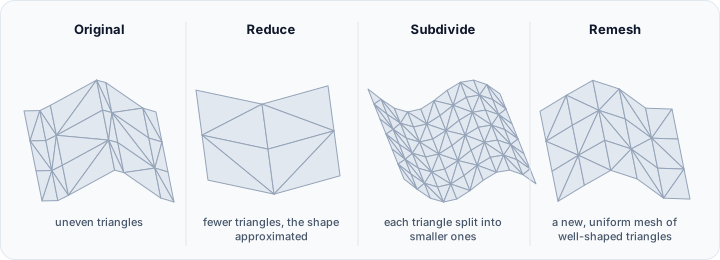
The Reduce tool decreases the number of triangles in a surface mesh through intelligent decimation algorithms, creating a simplified approximation of the original geometry. This operation is essential for optimizing mesh complexity for visualization, file transfer, and downstream processing.
Overview
Mesh decimation systematically removes vertices and retriangulates the affected regions to reduce overall triangle count while minimizing geometric deviation from the original surface. The tool provides three distinct reduction strategies, each optimizing for different quality criteria:
- Smart triangle reduction: Preserves topology and overall mesh quality
- Feature-based triangle reduction: Maintains geometric features and edges
- Triangle reduction by joining nearby points: Consolidates vertices within a distance threshold
Effective decimation enables:
- Faster rendering: Reduced triangle counts improve visualization performance
- Smaller file sizes: Critical for data transfer and storage
- Downstream processing efficiency: Many operations scale with triangle count
- Level-of-detail creation: Generate multiple resolution versions of the same model
Accessing the Tool
Navigate to the Surface ribbon tab and click Reduce in the Edit section. The controls open in the Task dock on the right.
The Target object(s) list decides what is reduced: the active surface object, the selected surface object(s), the visible surface object(s), or all surface objects.
Reset restores every default listed on this page, for all three methods at once. Otherwise your settings are remembered between sessions.
Target Specification
Each method supports two ways of specifying the reduction target:
Desired Percentage
Specify the percentage of triangles to remove from the original mesh:
- A 50% reduction removes half the triangles and keeps the other half
- Range: 1% to 99% for Smart triangle reduction, 1% to 95% for Feature-based triangle reduction
- Default: 50%
This approach is intuitive when you want consistent reduction across multiple surfaces or when absolute triangle counts are less important than relative simplification.
Desired Triangles
Specify the target triangle count for the output mesh:
- Range: 1 to 999,999,999 triangles
- Default: 3000
The Desired percentage and Desired triangles radio buttons are mutually exclusive, and only the field belonging to the selected one accepts input.
This approach is useful when you need precise control over output complexity, such as when targeting specific performance budgets or file size limits.
Reduction Methods
Smart Triangle Reduction
The smart method uses quadric error metrics to identify which edges can be collapsed with minimal impact on surface geometry. This algorithm:
- Evaluates each edge: Calculates the geometric error that would result from collapsing it
- Prioritizes low-impact collapses: Removes edges that contribute least to surface shape
- Preserves topology: Maintains the overall structure and avoids creating holes or inversions
Parameters:
- Reduction percent (%): default 50%; range 1-99%
- Target triangles: alternative specification for an absolute triangle count; default 3000
Characteristics:
- Excellent preservation of overall shape
- Maintains mesh topology (no holes created)
- Produces well-shaped triangles in output
- Automatic handling of complex geometry
Best suited for:
- General-purpose decimation
- Organic and smooth surfaces
- Visualization and rendering optimization
- Creating level-of-detail models
Feature-Based Triangle Reduction
The feature-based method incorporates edge sharpness detection to preserve geometric features during decimation. This approach:
- Detects feature edges: Identifies edges where adjacent triangles meet at significant angles
- Constrains decimation: Prevents removal of edges along detected features
- Preserves geometric character: Maintains the defining edges and corners of the model
Parameters:
- Feature angle (°): threshold for feature edge detection; default 15°; range 0-180°
- Reduction percent (%): default 50%; range 1-95%
- Target triangles: alternative absolute specification; default 3000
How feature angle works:
The feature angle determines which edges are protected from decimation:
| Feature Angle | Effect |
|---|---|
| 0° | All edges considered features (minimal reduction) |
| 15-30° | Only sharp edges protected |
| 45-60° | Moderate edges protected |
| 90-120° | Only very sharp corners protected |
| 180° | No features protected (maximum reduction) |
Lower values protect more edges; higher values allow more aggressive decimation.
Best suited for:
- Mechanical and CAD models with defined edges
- Architectural geometry
- Models where sharp features define the design
- Mixed geometry with both smooth and sharp regions
Triangle Reduction by Joining Nearby Points
This method consolidates vertices that are within a specified distance of each other, effectively merging nearby points and removing the resulting degenerate triangles. Unlike the other methods, this approach is distance-based rather than count-based:
Parameters:
- Nearby point distance (mm): maximum distance for vertex merging; default 1.0 mm
Mechanism:
- Identifies vertex pairs within the specified distance
- Merges nearby vertices into single points
- Removes degenerate triangles (zero area)
- Retriangulates as necessary
Characteristics:
- Result depends on vertex distribution, not target count
- Effective for meshes with many nearly-coincident vertices
- Can significantly reduce mesh complexity when vertices are clustered
- May have minimal effect on well-distributed meshes
Best suited for:
- Meshes with duplicate or nearly-duplicate vertices
- Cleaning up Boolean operation results
- Post-processing CAD imports with tolerance issues
- Meshes with locally over-refined regions
Practical Guidance
Choosing the Right Method
| Scenario | Recommended Method |
|---|---|
| General simplification | Smart triangle reduction |
| Mechanical parts | Feature-based reduction |
| Organic/anatomical models | Smart triangle reduction |
| Cleaning redundant vertices | Join nearby points |
| Maximum control over features | Feature-based with tuned angle |
| Fastest processing | Smart triangle reduction |
Reduction Guidelines
The appropriate reduction level depends on your use case:
| Use Case | Typical Reduction | Notes |
|---|---|---|
| Real-time visualization | 80-95% | Prioritize performance |
| Web/mobile viewing | 70-90% | Balance quality and file size |
| 3D printing | 0-50% | Preserve detail for manufacturing |
| CAD export | 20-40% | Maintain precision |
| Archival storage | 0-20% | Preserve maximum detail |
Iterative Reduction
For aggressive reduction (>90%), consider iterative approaches:
- Apply moderate reduction (50-70%)
- Evaluate result quality
- Apply additional reduction if needed
- Repeat until target is reached
This allows you to identify the threshold where quality becomes unacceptable.
Quality Verification
After decimation, verify the result:
- Visual inspection for artifacts
- Measurement comparison with original
- Check for topology changes (new holes, inverted triangles)
- Verify feature edges are preserved if required
Use the Diagnostics and Fixes tool to identify any mesh issues introduced by aggressive reduction.
Technical Considerations
Topology Preservation
The smart and feature-based methods preserve mesh topology—they will not create holes in closed surfaces or change the number of disconnected shells. The join nearby points method may alter topology if merged vertices belong to different triangles.
Edge Cases
Certain geometric configurations may limit reduction:
- Very small surfaces: May not have enough triangles for meaningful reduction
- Already-minimal meshes: Highly reduced meshes resist further simplification
- Complex topology: Surfaces with many holes or handles may have reduction limits
Processing Performance
Decimation performance scales with input triangle count:
- Smart method: O(n log n) typical case
- Feature-based: Slightly slower due to feature detection
- Join nearby points: O(n²) worst case; depends on spatial distribution
For very large meshes (millions of triangles), processing may take significant time. Consider processing subsets or using the fast method for preview.
Reversibility
Decimation permanently removes geometric information. Unlike smoothing, which adjusts vertex positions, decimation removes vertices entirely. Always preserve the original mesh when experimenting with reduction settings.
Common Issues and Solutions
| Issue | Likely Cause | Solution |
|---|---|---|
| Sharp edges lost | Using smart method | Switch to feature-based; lower feature angle |
| Visible faceting | Excessive reduction | Reduce less; accept higher triangle count |
| Holes in surface | Topology error | Use lower reduction; check input mesh quality |
| Minimal reduction | Too low feature angle | Increase feature angle |
| Unexpected result | Wrong method for geometry type | Try different method |
| Slow processing | Very large mesh | Process in stages; use preview settings first |