Hollow
The Hollow tool transforms solid surface models into hollow shells by creating an offset surface and combining it with the original to produce a structure with defined wall thickness. This operation is essential for 3D printing optimization, material reduction, and creating functional hollow objects.
Overview
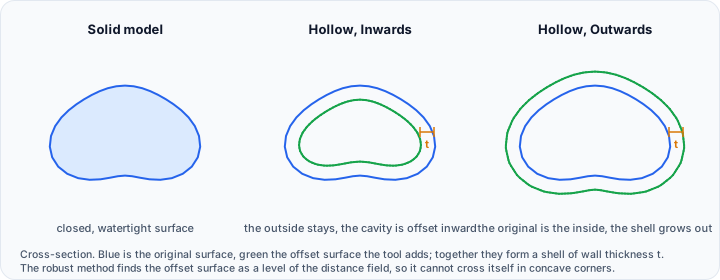
Hollowing a solid model involves generating an interior surface offset from the original exterior surface by a specified thickness. The result is a shell structure that maintains the external appearance of the original while significantly reducing:
- Material usage: Critical for 3D printing cost reduction
- Weight: Important for functional prototypes and end-use parts
- Print time: Hollow structures print faster than solid equivalents
The tool handles the complex geometric challenges of offset surface generation, including:
- Self-intersection detection and resolution
- Sharp corner handling
- Thin feature preservation
- Watertight output generation
Accessing the Tool
Navigate to the Surface ribbon tab and locate Hollow in the Edit section. Select a closed surface object before activating the tool. The surface must be watertight for meaningful hollowing results.
Hollowing Methods
Two algorithms are available, each with different performance characteristics:
Fast Method
The fast method uses vertex normal-based offsetting, which calculates the offset surface by moving each vertex along its normal direction by the specified thickness. This approach:
- Advantages: Rapid processing, lower memory requirements
- Limitations: May produce self-intersections in complex geometry, less robust for sharp corners
- Best for: Simple geometries, quick previews, surfaces with gentle curvature
The fast method works well for organic shapes without sharp corners or thin features. It may produce artifacts where the surface curves sharply inward, as the offset vectors can intersect.
Robust Method
The robust method employs distance field-based offset calculation, computing a signed distance field from the surface and then extracting an isosurface at the specified thickness distance. This approach:
- Advantages: Handles complex geometry correctly, no self-intersections, proper sharp corner handling
- Limitations: Slower processing, higher memory usage
- Best for: Complex geometries, sharp corners, production-quality output
The robust method is recommended for final output and complex geometries, as it guarantees topologically correct results without self-intersections.
Resolution Settings
Resolution appears only when Robust is selected, because it controls the precision that method works at. It has no effect on Fast and is therefore hidden for it.
| Resolution | Precision | Processing Time | Use Case |
|---|---|---|---|
| Low | Coarse approximation | Fastest | Quick preview, simple shapes |
| Medium | Balanced accuracy | Moderate | General purpose |
| High | Fine detail preservation | Slower | Complex geometry, thin walls |
| Maximum | Highest precision | Slowest | Production output, critical dimensions |
Higher resolution settings are especially important when:
- Wall thickness approaches the minimum feature size
- The model contains fine details that must be preserved
- Dimensional accuracy is critical
Offset Direction
The offset direction determines whether the hollow cavity is created by moving the surface inward or outward:
Inwards
The inward offset creates the hollow cavity inside the original surface bounds. The external appearance remains unchanged while the interior is hollowed out. This is the standard approach for:
- 3D printing optimization (maintaining external dimensions)
- Creating hollow versions of existing designs
- Reducing weight while preserving external fit
Outwards
The outward offset expands the surface outward while creating a hollow interior at the original surface location. This approach:
- Maintains the original geometry as the inner surface
- Expands the overall dimensions
- Useful when the inner dimensions are critical (e.g., molds, enclosures)
Wall Thickness
Thickness (mm) defines the wall thickness of the resulting hollow shell, and starts at 1 mm. Consider the following when setting it:
Minimum Thickness Guidelines
For 3D printing, minimum wall thickness depends on the printing technology:
| Technology | Minimum Recommended |
|---|---|
| FDM | 0.8 - 1.2 mm |
| SLA/DLP | 0.5 - 1.0 mm |
| SLS | 0.7 - 1.0 mm |
| Metal printing | 0.4 - 0.8 mm |
Structural Considerations
Wall thickness affects structural integrity:
- Too thin: Risk of breakage, print failures, or insufficient strength
- Too thick: Diminished material savings, longer print times
- Variable geometry: Complex shapes may require thicker walls for printability
As a general guideline, wall thickness should be at least 2-3 times the minimum feature size of your manufacturing process.
Output as new surface object
Tick Output as new surface object to write the result to a new object and leave the original untouched. This is useful for:
- Comparing the original and hollow versions side by side
- Keeping the original available for other operations
- Producing several hollow variants at different thicknesses
When it is left unticked, the hollow operation modifies the target surfaces in place.
Workflow for 3D Printing
A typical workflow for preparing models for 3D printing:
- Ensure watertight geometry: Use the Diagnostics and Fixes tool to verify and repair the surface
- Select appropriate method: Use robust method for complex geometry
- Choose resolution: Higher resolution for fine details and thin walls
- Set direction: Inwards to maintain external dimensions
- Specify thickness: Based on material and printing technology
- Add drain holes: Use the Cut tool to create holes for resin or powder escape
Adding Drain Holes
For resin-based printing (SLA/DLP) or powder-based printing (SLS), hollow models require drain holes to:
- Allow uncured resin or loose powder to escape
- Prevent pressure buildup during printing
- Enable post-processing (cleaning, curing)
After hollowing, use the Cut tool or Editor to create appropriately sized holes in inconspicuous locations.
Technical Considerations
Self-Intersection Handling
When the offset distance exceeds the local radius of curvature, the offset surface will self-intersect. The robust method detects and resolves these intersections, but the fast method may produce problematic output.
If you observe artifacts with the fast method, switch to the robust method or reduce the wall thickness.
Thin Features
Model regions thinner than twice the wall thickness cannot be properly hollowed—they would result in zero or negative wall thickness. The algorithm handles these cases by:
- Leaving very thin regions solid
- Merging walls where they would overlap
- Eliminating interior volumes that are too small
Open Surfaces
The hollow tool requires closed (watertight) surfaces. Open surfaces cannot define an interior volume and will not produce meaningful results. Use the Fill Holes tool to close any openings before hollowing.
Memory Requirements
The robust method's distance field computation requires memory proportional to the model volume and resolution setting. For very large models at maximum resolution, memory consumption may be significant. Consider using lower resolution settings for preview and maximum resolution only for final output.
Common Issues and Solutions
| Issue | Likely Cause | Solution |
|---|---|---|
| Self-intersecting output | Fast method with complex geometry | Switch to robust method |
| Missing thin features | Wall thickness too large | Reduce thickness or adjust design |
| Incomplete hollowing | Open or non-manifold input | Repair surface topology first |
| Very slow processing | High resolution + large model | Use lower resolution for preview |
| Unexpected solid regions | Thin features in original | Accept as necessary for printability |