Smooth
The Smooth tool applies surface smoothing algorithms to reduce noise, remove small irregularities, and improve the overall appearance of mesh surfaces. The tool offers two distinct smoothing approaches—each with different characteristics suited to particular applications.
Overview
Surface smoothing is a fundamental mesh processing operation that adjusts vertex positions to reduce local curvature variations and surface irregularities. While conceptually simple, effective smoothing requires balancing noise reduction against feature preservation and volume shrinkage.
Common applications include:
- Noise reduction: Removing scanning artifacts and segmentation irregularities
- Visual improvement: Creating smoother, more aesthetically pleasing surfaces
- Pre-processing: Preparing surfaces for downstream operations that benefit from cleaner input
- Post-processing: Refining surfaces after Boolean operations or remeshing
Accessing the Tool
Navigate to the Surface ribbon tab and click Smooth in the Edit section. The controls open in the Task dock on the right.
Target object(s)
The Target object(s) list decides what is smoothed:
| Option | Smooths |
|---|---|
| Active surface object | The surface currently active in the Scene Tree |
| Selected surface object(s) | Every surface selected in the Scene Tree |
| Visible surface object(s) | Every surface currently shown in the views |
| All surface objects | Every surface in the project |
| Selected triangles on visible surface object(s) | Only the triangles you select in the 3D view |
Choosing the last option reveals the selection tools underneath, so you can pick the triangles to smooth with the brush and ROI tools before applying. Everything outside the selection is left untouched, which is the way to smooth one rough patch without softening the rest of the model.
Smoothing Methods
Two fundamentally different smoothing algorithms are available:
Basic (Laplacian Smoothing)
Laplacian smoothing is an iterative algorithm that moves each vertex toward the average position of its neighbors. This classic approach:
- Mechanism: Each vertex moves toward the centroid of its neighboring vertices
- Characteristics: Simple, predictable behavior; progressive smoothing with iterations
- Limitation: Causes volume shrinkage over many iterations
Laplacian smoothing is intuitive and controllable. Low iteration counts provide subtle smoothing, while higher counts produce increasingly smooth surfaces. However, the shrinkage effect becomes pronounced with many iterations.

Best suited for:
- Quick noise reduction with few iterations
- Situations where some shrinkage is acceptable
- Simple, predictable smoothing requirements
Smart (Windowed Sinc Smoothing)
Windowed Sinc smoothing is a frequency-based filtering method that provides superior smoothing characteristics by treating the mesh as a signal and filtering out high-frequency components (noise) while preserving low-frequency components (overall shape).
- Mechanism: Spectral filtering using a windowed sinc function
- Characteristics: Minimal volume shrinkage, better feature preservation
- Advantage: Maintains overall shape while removing noise
This method is generally preferred for quality-critical applications as it produces superior results without the shrinkage problems of Laplacian smoothing.

Best suited for:
- High-quality smoothing with shape preservation
- Anatomical models where accuracy matters
- Multiple smoothing passes without cumulative shrinkage
Parameters
Both methods take the same four settings, but the smoothing strength behaves differently in each, and each method keeps its own values.
Basic
| Control | Range | Default | Description |
|---|---|---|---|
| Iterations | 2 to 9999 | 3 | How many smoothing passes to run. More passes give a smoother result and more shrinkage |
| Smooth factor | 0.001 to 1 | 0.6 | The smoothing strength of each pass. Higher values produce more smoothing |
| Feature edges | on / off | On | Detect sharp interior edges and protect them from being smoothed away |
| Feature angle (°) | 0 to 180 | 85 | The angle above which an edge counts as sharp. Available while Feature edges is on |
Smart
| Control | Range | Default | Description |
|---|---|---|---|
| Iterations | 2 to 9999 | 20 | How many filtering passes to run |
| Smooth factor | 0.0001 to 1 | 0.01 | The smoothing strength of the filter. Lower values produce more smoothing, which is the opposite of the Basic method |
| Feature edges | on / off | On | Detect sharp interior edges and protect them from being smoothed away |
| Feature angle (°) | 0 to 180 | 85 | The angle above which an edge counts as sharp. Available while Feature edges is on |
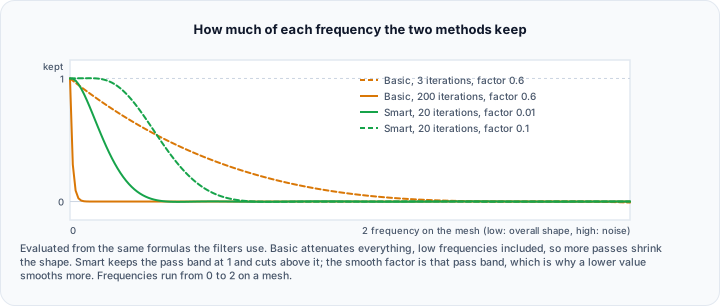
In Basic, a larger smooth factor smooths more. In Smart, a smaller smooth factor smooths more. Carrying a value across from one method to the other gives the opposite of what you expect.
Feature edges and the feature angle
With Feature edges on, the tool first finds the sharp interior edges of the mesh and then leaves the vertices along them alone, so designed corners survive the smoothing while the rest of the surface is relaxed. The Feature angle is what "sharp" means: an edge counts as a feature when the angle between its two triangles exceeds it.
- A smaller angle marks more edges as features, so more of the surface is protected and less is smoothed.
- A larger angle marks fewer edges as features, so the smoothing reaches further into the geometry.
With Feature edges off, no edge is protected and everything is smoothed equally, which is what you want for organic shapes with no designed corners.
Reset
Reset restores the defaults listed above for both methods at once. Otherwise your settings are remembered between sessions.
Practical Guidance
Choosing Between Methods
| Scenario | Recommended Method |
|---|---|
| Quick preview smoothing | Basic (Laplacian) |
| Quality-critical output | Smart (Windowed Sinc) |
| Anatomical models | Smart (Windowed Sinc) |
| Mechanical parts with sharp edges | Either, with feature edge smoothing |
| Iterative refinement | Smart (Windowed Sinc) |
Preserving Sharp Edges
For models with intentional sharp edges, such as mechanical parts:
- Leave Feature edges on.
- Lower the Feature angle until the corners you care about are protected.
- Keep the smoothing itself moderate, so the faces between the corners stay flat.
Addressing Volume Shrinkage
If the Basic method shrinks the model too much:
- Switch to Smart, which barely shrinks at all.
- Reduce Iterations, and lower the Basic Smooth factor if you stay on Basic.
- Consider Remesh instead, which rebuilds the triangulation rather than moving the existing vertices.
Smoothing Noisy Segmentation Results
For surfaces generated from image segmentation:
- Choose the Smart method.
- Leave Iterations at 20 and adjust from there.
- Leave Smooth factor at its default of 0.01, and lower it further if staircase artefacts remain.
- Turn Feature edges off, because staircase artefacts from voxel data are not real features and protecting them keeps the very thing you are trying to remove.
Technical Considerations
Vertex Connectivity
Smoothing operates on vertex positions based on mesh connectivity. Isolated vertices or poorly connected regions may smooth differently than well-connected areas.
Boundary Handling
Open surfaces with boundary edges have special handling—boundary vertices are typically constrained to smooth only along the boundary, preserving the open edge.
Computational Cost
- Laplacian smoothing: Linear in vertex count × iterations; very fast
- Windowed Sinc: More complex per-iteration computation; moderate speed
Both methods scale well to large meshes, with Windowed Sinc requiring more computation per iteration but often fewer iterations for equivalent results.
Reversibility
Smoothing moves the vertices of the target surfaces in place; the detail it removes is not recoverable from the result. Undo reverses the last smoothing, and duplicating the surface from the Scene Tree before you start gives you an untouched copy to compare against or fall back to.
Common Issues and Solutions
| Issue | Likely Cause | Solution |
|---|---|---|
| Excessive shrinkage | Too many Basic iterations | Switch to Smart, or lower Iterations and Smooth factor |
| Sharp edges rounded | Feature edges turned off, or the feature angle set too high | Turn Feature edges on and lower the Feature angle |
| Noise not removed | Smoothing too weak | Increase Iterations; raise the Basic smooth factor, or lower the Smart one |
| Processing too slow | Very high iteration count | Reduce Iterations |
| Uneven smoothing | Non-uniform triangle density | Run Remesh first for evenly sized triangles |
| Nothing changes | Target set to selected triangles with nothing selected | Select triangles in the 3D view, or change the target |