Voxel Remesh
The Voxel Remesh tool reconstructs a surface mesh by converting it to a volumetric representation and then extracting a new isosurface. This voxel-based approach fundamentally differs from traditional remeshing by treating the surface as a volume boundary, enabling powerful mesh repair and regularization capabilities.
Overview
Voxel remeshing operates through a three-stage process:
- Voxelization: The surface is converted to a 3D voxel grid where each voxel is classified as inside or outside the object
- Distance field computation: A signed distance field is calculated from the voxel boundary
- Isosurface extraction: A new mesh is generated by extracting the zero-level isosurface
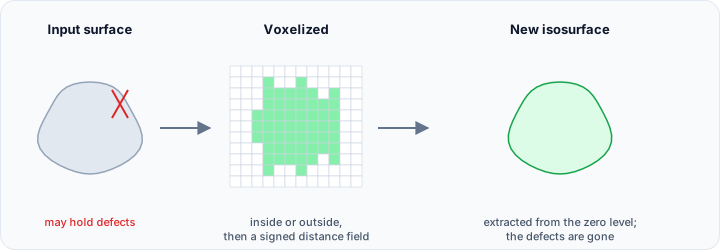
This volumetric approach offers unique advantages over surface-based remeshing:
- Automatic topology repair: Self-intersections, holes, and non-manifold geometry are automatically resolved
- Noise removal: Small surface defects are naturally smoothed during voxelization
- Shell unification: Overlapping or intersecting shells are merged into a coherent surface
- Consistent normals: The extracted surface has correctly oriented normals throughout
Accessing the Tool
Navigate to the Surface ribbon tab and locate Voxel Remesh in the Edit section. Select one or more surfaces before activating the tool.
Voxelization Methods
Two methods are available, each optimizing for different priorities:
Accurate Method
The accurate method prioritizes geometric fidelity by using a finer voxel grid and more precise distance field calculations. This approach:
- Preserves fine geometric details better
- Uses more memory and processing time
- Produces results closer to the original surface
Use the accurate method when geometric precision is paramount, such as for manufacturing, measurement, or detailed anatomical models.
Fast Method
The fast method optimizes for processing speed using efficient algorithms that may sacrifice some geometric detail:
- Significantly faster processing
- Lower memory requirements
- Suitable for preview or interactive workflows
The fast method is ideal for initial exploration, large datasets, or situations where processing time is a constraint.
Voxel Spacing Configuration
The voxel spacing determines the resolution of the volumetric grid and directly impacts both the quality of the result and the computational requirements:
X, Y, Z
The Voxel spacing group takes an independent voxel size along each axis:
- X (mm): voxel size along X
- Y (mm): voxel size along Y
- Z (mm): voxel size along Z
Smaller spacing values produce finer resolution and better geometric preservation but require more memory and processing time. The relationship is cubic—halving the voxel spacing increases memory requirements by a factor of eight.
Uniform Spacing
Enable Uniform spacing to use the same voxel size in all directions. This is recommended for most applications as it:
- Produces isotropic mesh quality
- Simplifies parameter selection
- Avoids directional artifacts in the result
When uniform spacing is enabled, adjusting any axis value automatically updates all three dimensions.
Choosing Appropriate Spacing
The optimal voxel spacing depends on the smallest features you need to preserve:
| Feature Size | Recommended Spacing | Application |
|---|---|---|
| Large features only | 1.0 - 2.0 mm | Quick repair, simplification |
| Standard detail | 0.3 - 0.5 mm | General purpose remeshing |
| Fine detail | 0.1 - 0.2 mm | Detailed anatomical models |
| Very fine detail | 0.05 - 0.1 mm | High-precision applications |
As a guideline, the voxel spacing should be approximately 1/3 to 1/2 the size of the smallest features you want to preserve.
Smoothing Option
Enable the Smooth option to apply post-processing smoothing to the extracted surface. This additional step:
- Reduces staircase artifacts from voxelization
- Produces smoother surface appearance
- Slightly reduces geometric accuracy
Smoothing is particularly beneficial when using larger voxel spacings, as it mitigates the blocky artifacts that can result from coarse voxelization.
Use Cases
Mesh Repair
Voxel remeshing is exceptionally effective for repairing problematic meshes:
Self-intersecting surfaces: When triangles penetrate each other, voxelization naturally resolves the intersections by treating the surface as a boundary rather than individual triangles.
Non-manifold geometry: Edges shared by more than two triangles, or vertices where the surface topology is ambiguous, are automatically corrected during isosurface extraction.
Holes and gaps: Small holes in the surface are often filled during voxelization if they are smaller than the voxel spacing.
Boolean Operation Preparation
Surfaces intended for Boolean operations must be watertight and topologically valid. Voxel remeshing can prepare problematic meshes for Boolean operations by ensuring:
- Closed, watertight surfaces
- Consistent normal orientation
- Removal of self-intersections
Merging Multiple Shells
When a surface contains multiple overlapping or adjacent shells that should be unified, voxel remeshing naturally merges them into a single coherent surface based on the volumetric inside/outside classification.
Technical Considerations
Memory Requirements
Voxel remeshing requires memory proportional to the volume of the bounding box divided by the cube of the voxel spacing:
where is the bounding box volume and is the voxel spacing.
For large objects or fine voxel spacings, memory requirements can become substantial. Consider:
- Using the fast method for large objects
- Starting with coarser spacing and refining as needed
- Processing different regions separately if memory is limited
Detail Loss
Voxelization inherently limits the minimum feature size that can be represented. Features smaller than approximately 2-3 voxels may be lost or distorted. This behavior is often beneficial for noise removal but may be problematic for surfaces with intentionally fine features.
Watertight Requirement
The voxelization process requires surfaces to be reasonably close to watertight for proper inside/outside classification. Surfaces with large holes or open boundaries may produce unexpected results, as the algorithm cannot reliably determine the interior volume.
Comparison with Standard Remesh
| Aspect | Remesh | Voxel Remesh |
|---|---|---|
| Approach | Surface-based triangulation | Volume-based reconstruction |
| Topology repair | Limited | Comprehensive |
| Feature preservation | Edge preservation option | Limited by voxel resolution |
| Speed | Generally faster | Depends on voxel count |
| Memory | Proportional to triangle count | Proportional to volume/spacing³ |
| Best for | Quality improvement | Repair and unification |
Choose standard remeshing when the input mesh is topologically valid and you primarily want improved triangle quality. Choose voxel remeshing when you need to repair topology, merge shells, or remove self-intersections.