Subdivide
The Subdivide tool increases surface mesh resolution by splitting existing triangles into smaller triangles using various subdivision algorithms. This operation is essential for adding geometric detail, preparing meshes for high-quality rendering, or creating smoother surfaces from coarse input.
Overview
Subdivision surfaces are a powerful technique for generating smooth, high-resolution meshes from coarse polygon models. The process works by recursively splitting triangles and, depending on the algorithm, adjusting vertex positions to create progressively smoother geometry.
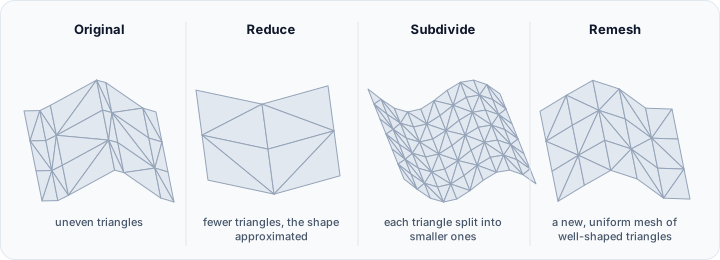
Common applications include:
- Detail enhancement: Adding resolution for sculpting or fine detail work
- Smooth surface generation: Creating organic shapes from low-polygon input
- Rendering preparation: Generating displacement-ready meshes
- Animation preparation: Creating meshes with sufficient resolution for deformation
Accessing the Tool
Navigate to the Surface ribbon tab and locate Subdivide in the Edit section. Select one or more surface objects before activating the tool.
Target object(s)
The Target object(s) list decides what is subdivided: the active surface object, the selected surface object(s), the visible surface object(s), or all surface objects.
Subdivision Methods
Four distinct subdivision algorithms are available, each with different characteristics:
Linear Subdivision
Linear subdivision splits each triangle into smaller triangles without changing the overall shape. New vertices are placed at the midpoints of edges, creating four triangles from each original triangle.
Characteristics:
- Preserves the original surface shape exactly
- No smoothing or shape modification
- Predictable triangle count increase (4× per subdivision level)
- Fast processing
Best suited for:
- Increasing resolution while preserving sharp edges
- Preparing meshes for displacement mapping
- Adding vertices for vertex-based operations
- Mechanical or architectural models with flat faces
Adaptive Subdivision
Adaptive subdivision varies the level of refinement based on local geometry, adding more triangles in curved or detailed regions while keeping flat areas relatively sparse.
Characteristics:
- Intelligent distribution of triangles
- Efficient use of mesh resources
- Edge length-based refinement control
- Better quality-to-triangle-count ratio
Best suited for:
- Organic models with varying detail levels
- Optimizing subdivision for rendering performance
- Models with both smooth and flat regions
- Efficient mesh refinement
Loop Subdivision
Loop subdivision is a well-established algorithm for triangular meshes that both refines and smooths the surface. It produces approximating subdivision surfaces where the limit surface is smooth but may not interpolate the original vertices.
Characteristics:
- Creates smooth, rounded surfaces
- Approximating scheme (original vertices may shift slightly)
- C² continuity on regular regions (smooth second derivatives)
- Well-suited for organic modeling
Best suited for:
- Organic and character modeling
- Creating smooth surfaces from coarse cages
- Animation-ready mesh generation
- Artistic modeling workflows
Butterfly Subdivision
Butterfly subdivision is an interpolating scheme that generates smooth surfaces while exactly preserving the positions of original vertices. This makes it ideal when control point positions must remain unchanged.
Characteristics:
- Interpolating scheme (original vertices stay in place)
- Creates smooth surfaces
- Better for maintaining specific vertex positions
- May produce artifacts at extraordinary vertices
Best suited for:
- Preserving known vertex positions (landmarks, measurements)
- Medical and scientific visualization
- Cases where original control points must be maintained
- Interpolating point cloud data
Subdivision Parameters
The Parameters group shows only what the selected method uses: Subdivision for Linear, Loop, and Butterfly, and Maximum edge length (mm) for Adaptive.
Subdivision
Controls how many levels of subdivision are applied, starting at 1. Each level multiplies the triangle count:
| Level | Triangle Multiplier | Effect |
|---|---|---|
| 1 | 4× | Basic refinement |
| 2 | 16× | Moderate refinement |
| 3 | 64× | Significant refinement |
| 4 | 256× | Very high resolution |
| 5 | 1024× | Extremely high resolution |
Warning: High subdivision levels can rapidly increase mesh complexity. A mesh with 10,000 triangles subdivided 4 times would result in 2.56 million triangles. Monitor memory usage and consider practical limits.
Maximum edge length (mm)
Shown only for Adaptive, and used in place of a subdivision level. Edges longer than this threshold are split; shorter edges are left alone, so refinement lands where the triangles are large and leaves the fine areas as they are. The default is 1 mm.
- Smaller values: more refinement, higher triangle count
- Larger values: less refinement, faster processing
This is the way to get consistent triangle sizes across a model whose original mesh density varies.
Method Comparison
| Aspect | Linear | Adaptive | Loop | Butterfly |
|---|---|---|---|---|
| Shape preservation | Exact | Approximate | Approximate | Exact vertices |
| Smoothing | None | Optional | Yes | Yes |
| Vertex interpolation | Yes | Varies | No | Yes |
| Triangle distribution | Uniform | Adaptive | Uniform | Uniform |
| Speed | Fastest | Moderate | Moderate | Moderate |
| Memory | Predictable | Variable | Predictable | Predictable |
Practical Guidance
Choosing the Right Method
For mechanical parts: Use Linear subdivision to add resolution while preserving flat surfaces and sharp edges exactly.
For organic shapes: Use Loop subdivision for smooth, natural-looking surfaces. The slight vertex shifting is generally acceptable and produces better results.
For measured data: Use Butterfly subdivision when original vertex positions represent actual measurements or landmarks that must be preserved.
For efficiency: Use Adaptive subdivision when you need varied resolution across the model without excessive triangle counts in flat regions.
Workflow Recommendations
- Start with low levels: Begin with 1-2 subdivision levels and evaluate the result before going higher
- Consider downstream operations: Higher polygon counts increase processing time for subsequent operations
- Use adaptive when possible: Adaptive subdivision often provides the best quality-to-performance ratio
- Apply before detail work: Subdivide first, then apply sculpting or fine adjustments
Managing Large Meshes
For very large meshes or high subdivision levels:
- Test on a subset or low levels first
- Monitor system memory
- Consider subdividing in multiple passes
- Use the Reduce tool afterward if the result is too dense
Technical Considerations
Triangle Quality
Subdivision generally improves triangle quality (aspect ratio) for Loop and Butterfly methods, as the algorithms naturally produce well-shaped triangles. Linear subdivision preserves existing quality characteristics.
Boundary Handling
Different methods handle open surface boundaries differently:
- Linear: Boundary edges are simply split
- Loop/Butterfly: Special boundary rules maintain smooth edges while preventing shrinkage
Memory and Performance
Memory usage scales linearly with triangle count, which increases exponentially with subdivision levels. Performance is generally linear per triangle, but very large meshes may experience cache-related slowdowns.
Reversibility
Subdivision adds vertices that cannot be meaningfully removed—the original coarse mesh cannot be perfectly recovered from a subdivided result. Always maintain the original mesh when experimenting with subdivision settings.
Common Issues and Solutions
| Issue | Likely Cause | Solution |
|---|---|---|
| Out of memory | Too many subdivision levels | Reduce subdivision level; use adaptive method |
| Sharp edges became smooth | Using smoothing method | Switch to Linear subdivision |
| Slow processing | Very high polygon count | Reduce input mesh first; use fewer levels |
| Surface artifacts | Butterfly with irregular mesh | Switch to Loop method |
| Uneven density | Using non-adaptive method | Switch to Adaptive with edge length control |