Voxel Boolean
The Voxel Boolean tool performs Boolean operations using a voxel-based approach, providing a robust alternative to geometric Boolean operations. This method converts surfaces to a voxel representation, performs the Boolean operation in voxel space, and converts the result back to a surface mesh.
This tool is provided for research and educational purposes only. Any clinical or diagnostic use requires proper validation in accordance with applicable regulations.
Overview
Voxel Boolean operations work differently from geometric Boolean operations:
- Voxelization: Input surfaces are converted to 3D voxel grids (binary images)
- Boolean operation: The operation is performed on voxel data (simple logical operations)
- Surface extraction: The result is converted back to a triangulated surface
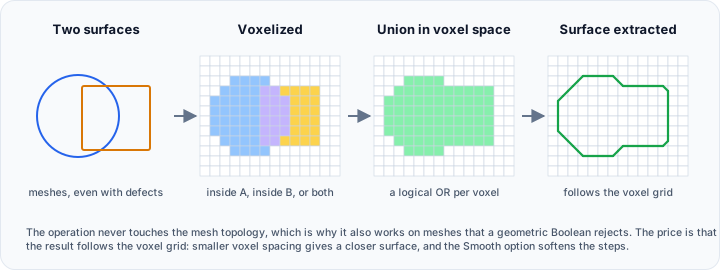
This approach is more robust than geometric Boolean because it doesn't depend on precise mesh topology—it works even with meshes that have holes, self-intersections, or other quality issues that would cause geometric Boolean to fail.
Interface
Boolean Operation
The standard Boolean operations are available:
| Operation | Description |
|---|---|
| Union | Combine volumes (A + B) |
| Intersection | Keep overlapping volume (A ∩ B) |
| Difference | Subtract B from A (A - B) |
Voxel Conversion Method
Select the voxelization algorithm:
| Method | Description |
|---|---|
| Accurate | High-accuracy voxelization producing smooth, detailed surfaces |
| Fast | Efficient voxelization with reduced quality (may produce pixelated artifacts) |
Voxel Spacing
Control the resolution of the voxel grid:
| Parameter | Description | Default |
|---|---|---|
| X (mm) | Voxel size along the X axis | 1.0 |
| Y (mm) | Voxel size along the Y axis | 1.0 |
| Z (mm) | Voxel size along the Z axis | 1.0 |
| Uniform spacing | Lock all axes to the same value | Optional |
Smaller spacing values produce higher-resolution results but require more memory and processing time.
Options
| Option | Description | Default |
|---|---|---|
| Smooth | Apply smoothing to the resulting surface | Disabled |
Parameters Explained
Voxel Conversion Method
Accurate:
- Uses a high-quality voxelization algorithm
- Produces smooth, accurate surfaces
- Slightly slower processing
- Recommended for final results
Fast:
- Uses an optimized but less precise algorithm
- May produce stair-stepping or pixelation artifacts
- Faster processing
- Suitable for previews or when speed is critical
Voxel Spacing
The voxel spacing determines the resolution of the intermediate voxel representation:
| Spacing | Effect | Use Case |
|---|---|---|
| Large (2-5 mm) | Coarse resolution, fast processing, may lose small features | Quick previews, large objects |
| Medium (0.5-1 mm) | Balanced resolution and performance | General use |
| Small (0.1-0.5 mm) | High resolution, slow processing, accurate details | Fine features, small objects |
Smaller voxel spacing dramatically increases memory requirements. A 100mm × 100mm × 100mm object at 0.1mm spacing creates 1 billion voxels. Start with larger spacing and reduce if needed.
Smooth Option
When enabled, the resulting surface undergoes smoothing to reduce stair-stepping artifacts from the voxelization process. This is especially useful when using:
- The Fast conversion method
- Larger voxel spacing values
Voxel Boolean vs. Geometric Boolean
| Aspect | Voxel Boolean | Geometric Boolean |
|---|---|---|
| Robustness | Very high—works with problematic meshes | Requires clean, manifold meshes |
| Accuracy | Resolution-dependent | High geometric precision |
| Speed | Consistent, depends on resolution | Fast for simple, slow for complex |
| Memory | Can be high for fine resolution | Generally lower |
| Best for | Problematic inputs, complex geometry | Clean, well-formed inputs |
When to use Voxel Boolean:
- Geometric Boolean fails or produces errors
- Input meshes have quality issues (holes, self-intersections)
- Working with complex, organic shapes
- Speed is less important than reliability
When to use Geometric Boolean:
- Input meshes are clean and manifold
- Maximum geometric precision is needed
- Memory is limited
- Processing simple geometries
Typical Workflows
Robust Union for Complex Shapes
When geometric Boolean fails:
- Open the Voxel Boolean tool
- Select Union operation
- Select input surfaces
- Choose Accurate method
- Set appropriate voxel spacing (0.5-1 mm for most cases)
- Enable Smooth for cleaner results
- Click Apply
Quick Preview Boolean
For fast iteration:
- Select Fast method
- Use larger spacing (2-3 mm)
- Apply the operation
- Once satisfied with the result, re-run with Accurate and finer spacing
Handling Problematic Meshes
When input meshes have quality issues:
- Try geometric Boolean first
- If it fails, switch to Voxel Boolean
- Use Accurate method for best results
- After the operation, run Diagnostics and Fixes to verify quality
Best Practices
-
Start with larger spacing: Begin with 1-2 mm spacing to test the operation quickly, then reduce for finer results.
-
Use Accurate for final output: The Fast method is useful for previews but may produce artifacts in the final result.
-
Enable Smooth when needed: If the result shows stair-stepping, enable smoothing or use finer spacing.
-
Consider memory limits: Monitor memory usage when using very fine spacing. Reduce resolution if you encounter memory errors.
-
Run diagnostics after: Voxel Boolean generally produces manifold results, but verify with Diagnostics and Fixes.
-
Use geometric Boolean when possible: If your meshes are clean, geometric Boolean is faster and more precise.
Troubleshooting
Out of Memory
If the operation fails due to memory:
- Increase voxel spacing (reduce resolution)
- Close other applications to free memory
- Process smaller regions separately
Stair-Stepping Artifacts
If the result has visible voxel steps:
- Use finer voxel spacing
- Enable the Smooth option
- Use the Accurate conversion method
Missing Features
If small features are lost:
- Reduce voxel spacing (smaller values = higher resolution)
- Ensure spacing is smaller than the smallest feature you need to preserve
See Also
- Boolean - Geometric Boolean operations
- Voxel Remesh - Related voxel-based surface processing
- Smooth - Post-processing for smoother surfaces
- Diagnostics and Fixes - Verify result quality