Swap Axes
The Swap Axes tool reorders (permutes) two spatial axes of the volume and mask datasets. This is useful for correcting axis orientation when data is imported with swapped dimensions, or when converting between different coordinate conventions used by scanners, simulation tools, or CAD/CAM software.
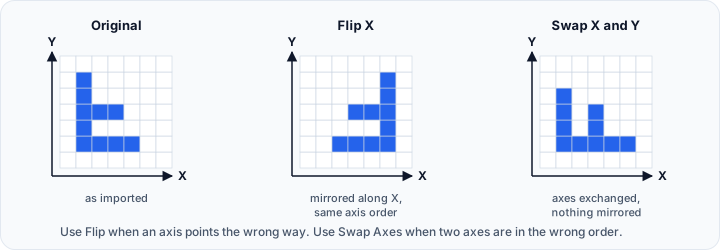
Swap Axes vs Flip
Swap Axes and Flip solve different orientation problems:
- Swap Axes changes the axis order. For example, X can become Y, or Y can become Z.
- Flip mirrors the data along one axis, but keeps the same axis order.
- Use Swap Axes when two axes are exchanged.
- Use Flip when an axis points in the wrong direction.
In short: Swap Axes transposes dimensions and spacing between axes, while Flip creates a mirror image without reordering the axes.
Accessing the Tool
- Navigate to the Image tab in the ribbon.
- Click Swap Axes in the Transform section.
Parameters
Swap Mode
Select the pair of axes to swap:
| Option | Effect |
|---|---|
| X ↔ Y | Swaps the X and Y axes (transposes the XY plane — width and depth) |
| X ↔ Z | Swaps the X and Z axes (transposes the XZ plane — width and height) |
| Y ↔ Z | Swaps the Y and Z axes (transposes the YZ plane — depth and height) |
Workflow
- Open the Swap Axes tool from the Image tab.
- Select the axis pair to swap (X↔Y, X↔Z, or Y↔Z).
- Click Apply to reorder the axes.
Use Cases
Correcting Import Orientation
Some scanners, simulation tools, or export pipelines store volume data with axes in a non-standard order:
- Identify which axes are transposed by comparing the object's dimensions and spacing against the expected geometry.
- Apply the appropriate swap to restore the correct orientation.
- Verify the result using the orthogonal slice views or the 3D render.
If the axes are not exchanged but instead one direction is inverted, use Flip instead.
Matching Coordinate Conventions
Different software packages (CAD, simulation, CT/micro-CT reconstruction, etc.) may use different axis orderings. Common examples:
- X ↔ Y — corrects between row-major and column-major storage conventions, or when width and depth are swapped on import.
- X ↔ Z — corrects when height (Z) and width (X) are exchanged, common when switching between Z-up and Y-up coordinate systems.
- Y ↔ Z — corrects when depth (Y) and height (Z) are exchanged, often needed when aligning industrial CT data with CAD models.
Affected Objects
Swapping axes affects:
- All volume objects
- All mask objects
Both are swapped together to maintain spatial correspondence.
Scripting
import ScriptingApi as api

app = api.Application()
volume_operations = app.get_volume_operations()

# Swap X and Y axes
volume_operations.swap_axes(["Volume 1"], api.SwapAxesPair.XY)

# Swap Y and Z axes
volume_operations.swap_axes(["Volume 1"], api.SwapAxesPair.YZ)

# Swap X and Z axes on multiple volumes
volume_operations.swap_axes(["Volume 1", "Volume 2"], api.SwapAxesPair.XZ)
Swapping axes changes the spatial geometry of the data. Any associated metadata describing the original axis order (such as DICOM orientation tags) will no longer be in sync with the modified image. Verify the orientation in the slice views after applying the operation.
See also: Flip