Combine
The Combine tool performs arithmetic operations between two volume images, creating a result that represents the mathematical combination of the inputs. This is useful for image comparison, fusion, and analysis.
Accessing the Tool
- Navigate to the Image tab in the ribbon.
- Click Combine in the Operations section.
Parameters
Operation
Select the mathematical operation to perform:
| Operation | Formula | Description |
|---|---|---|
| Add | A + B | Sum of intensity values |
| Subtract | A − B | Difference between volumes |
| Multiply | A × B | Product of intensity values |
| Divide | A ÷ B | Ratio of intensity values |
| Mean | (A + B) / 2 | Average of intensity values |
| Minimum | min(A, B) | Lower value at each voxel |
| Maximum | max(A, B) | Higher value at each voxel |
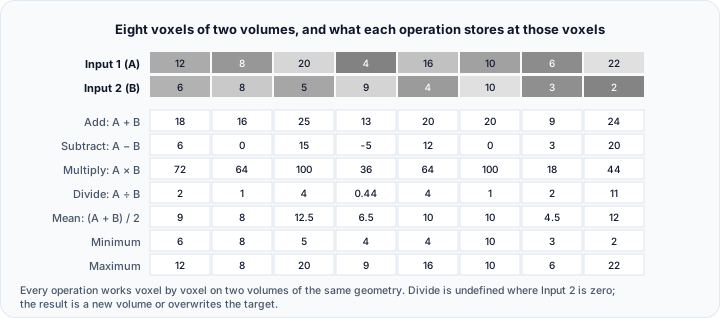
Input Volumes
| Parameter | Description |
|---|---|
| Input 1 | First operand volume |
| Input 2 | Second operand volume |
| Result | Target for the output (existing volume or new object) |
Output Options
| Option | Description |
|---|---|
| Create new object | Generate a new volume with the result |
| Overwrite target | Store result in an existing volume |
Operation Details
Add
Combines intensities additively:
Use case: Fusing complementary datasets, combining signal from multiple acquisitions.
Subtract
Calculates the difference between volumes:
Use case: Detecting changes between timepoints, removing background.
Multiply
Multiplies corresponding voxel values:
Use case: Applying masks or weight maps, combining probability maps.
Divide
Computes the ratio of voxel values:
Use case: Normalization, ratio imaging.
Division by zero produces undefined results. Ensure Input 2 does not contain zero values, or handle zeros appropriately.
Mean
Averages the two volumes:
Use case: Noise reduction by averaging multiple acquisitions.
Minimum
Takes the lower value at each position:
Use case: Finding common low-intensity regions.
Maximum
Takes the higher value at each position:
Use case: Maximum intensity projection from multiple angles, combining highlights.
Workflow
- Open the Combine tool from the Image tab.
- Select the desired Operation.
- Choose Input 1 and Input 2 volumes.
- Select or name the Result volume.
- Click Apply to perform the operation.
Requirements
- Both input volumes must have the same dimensions (voxel count in X, Y, Z).
- Volumes should be spatially aligned for meaningful results.
- If dimensions differ, resample one volume to match the other first.
The Combine operation works on the voxel grid. Volumes with different spacing but the same dimensions will combine based on voxel index, not physical position.
Use Cases
Change Detection
Compare scans from different timepoints:
- Register the follow-up scan to the baseline.
- Use Subtract to create a difference image.
- Positive values indicate increased intensity; negative indicate decreased.
Multi-Modal Fusion
Combine information from different imaging modalities:
- Register CT and MRI datasets.
- Use Add with appropriate scaling or Maximum to combine.
- Results show features from both modalities.
Background Removal
Remove a known background pattern:
- Acquire or calculate the background volume.
- Use Subtract to remove background from the signal.
Probability Map Combination
Combine multiple segmentation probability maps:
- Use Mean for equal weighting.
- Use Maximum to take the highest confidence.
- Use Multiply for intersection (AND-like behavior).
Scripting
The combine operation is available via the Python scripting API.
import ScriptingApi as api

app = api.Application()
volume_operations = app.get_volume_operations()

# Add two volumes, create new object
result_name = volume_operations.combine(
    "Volume1",                      # Input 1
    "Volume2",                      # Input 2
    "CombinedResult",               # Result name
    api.CombineOperation.Addition,  # operation: Addition, Subtraction, Multiplication, Division, Mean, Minimum, Maximum
    True                            # create_new_object
)
See the VolumeOperations API Reference for details.