Smooth / Denoise
The Smooth/Denoise tool applies various filtering algorithms to reduce noise in volume data while preserving important structural features. Different filters are optimized for different types of noise and image characteristics.
Accessing the Tool
- Navigate to the Image tab in the ribbon.
- Click Smooth/Denoise in the Operations section.
Parameters
Target Objects
Select which volumes to process:
- Active volume object
- Selected volume object(s)
- Visible volume object(s)
- All volume objects
Filter Selection
Choose a filter algorithm suited to your data characteristics and requirements.
Available Filters
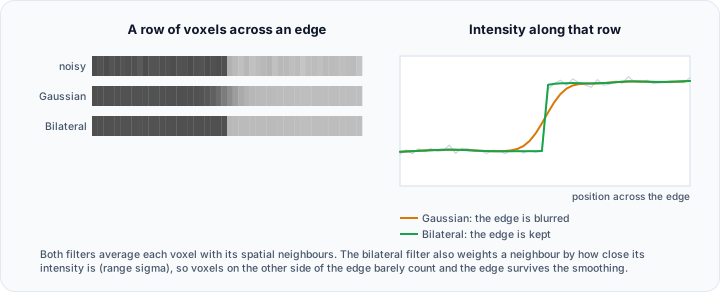
Bilateral Filter
Edge-preserving smoothing that blurs homogeneous regions while maintaining sharp edges.
| Parameter | Description |
|---|---|
| Isotropic | When checked (default), the same domain sigma is applied in all three directions. Uncheck to set X, Y, and Z independently. |
| Domain sigma X / Y / Z (px) | Spatial extent of smoothing along each axis in pixels |
| Range sigma | Intensity difference threshold for edge preservation |
| Kernel radius | Filter kernel size (0 = auto-calculate) |
Best for: General noise reduction with edge preservation.
Binomial Blur
Fast iterative averaging filter that approximates Gaussian smoothing.
| Parameter | Description |
|---|---|
| Iterations | Number of averaging passes (more = smoother) |
Best for: Quick smoothing when speed is important.
Curvature Anisotropic Diffusion
Edge-preserving smoothing based on image curvature, ideal for medical images.
| Parameter | Description |
|---|---|
| Iterations | Number of diffusion steps |
| Time step | Controls smoothing rate per iteration |
| Conductance | Edge sensitivity (lower = more edge preservation) |
Best for: Medical imaging with fine structural details.
Curvature Flow
Smoothing by flowing along image curvature without explicit edge detection.
| Parameter | Description |
|---|---|
| Iterations | Number of flow steps |
| Time step | Controls smoothing rate |
Best for: Robust smoothing with natural edge handling.
Discrete Gaussian
Classic Gaussian smoothing using a discrete kernel.
| Parameter | Description |
|---|---|
| Sigma X/Y/Z | Standard deviation in each direction |
| Use image spacing | If enabled, sigma is in mm; otherwise in pixels |
Best for: Standard smoothing with controllable directional strength.
Gaussian
Convolution-based Gaussian smoothing.
| Parameter | Description |
|---|---|
| Standard deviation | Kernel width in pixels |
| Radius factor | Kernel size multiplier |
| 3D processing | Apply in 3D (recommended) or slice-by-slice |
Best for: General-purpose smoothing.
Gradient Anisotropic Diffusion
Edge-preserving smoothing using image gradients for edge detection.
| Parameter | Description |
|---|---|
| Iterations | Number of diffusion steps |
| Time step | Smoothing rate per iteration |
| Conductance | Gradient threshold for edge preservation |
Best for: Images with strong edges and gradients.
Mean Filter
Simple neighborhood averaging.
| Parameter | Description |
|---|---|
| Radius X/Y/Z (pixels) | Neighborhood size in each direction |
Best for: Quick noise reduction; blurs edges.
Median Filter
Replaces each voxel with the median of its neighborhood. Effective for salt-and-pepper noise.
| Parameter | Description |
|---|---|
| Radius X/Y/Z (pixels) | Neighborhood size in each direction |
Best for: Impulse noise (isolated bright/dark spots).
Min/Max Curvature Flow
Advanced curvature-based smoothing with min/max constraints.
| Parameter | Description |
|---|---|
| Iterations | Number of flow steps |
| Time step | Smoothing rate |
| Stencil radius | Neighborhood for curvature calculation |
Best for: Controlled smoothing with curvature limits.
Patch-Based Denoising
Non-local means denoising using patch similarity. Highly effective for preserving fine details.
| Parameter | Description |
|---|---|
| Patch radius | Size of comparison patches |
| Noise model | Type of noise (Gaussian, Rician, Poisson) |
| Iterations | Number of denoising passes |
| Fidelity weight | Balance between denoising and fidelity |
Best for: High-quality denoising; computationally intensive.
Filter Selection Guide
| Noise Type | Recommended Filter |
|---|---|
| Gaussian noise | Gaussian, Discrete Gaussian, Patch-Based |
| Salt-and-pepper | Median |
| General with edges | Bilateral, Curvature Anisotropic Diffusion |
| Quick preview | Mean, Binomial Blur |
| High quality | Patch-Based Denoising |
Workflow
- Open the Smooth/Denoise tool.
- Select target volume(s).
- Choose an appropriate filter for your noise type.
- Adjust filter parameters.
- Click Apply to process the data.
- Compare before/after in slice views.
Start with moderate parameter values and increase smoothing strength gradually. Over-smoothing can remove important anatomical details.
Scripting
Smoothing and denoising filters are available via the Python scripting API.
import ScriptingApi as api

app = api.Application()
volume_operations = app.get_volume_operations()

# Gaussian filter
volume_operations.gaussian_filter(["Volume1"], 1.5, 2.0, True)

# Median filter
volume_operations.median_filter(["Volume1"], [2, 2, 2])  # radius in pixels

# Bilateral filter
volume_operations.bilateral_filter(["Volume1"], 2.0, 2.0, 2.0, 50.0, 0)

# Curvature anisotropic diffusion
volume_operations.curvature_anisotropic_diffusion_filter(["Volume1"], 5, 0.0625, 3.0)
See the VolumeOperations API Reference for the complete list of available filters.
Smoothing/denoising operations modify the original data. Consider working on a copy if you need to preserve the unfiltered data.