Additional Operations
The Additional menu provides access to supplementary image processing operations including intensity inversion, edge sharpening, advanced filters, and correction filters.
Accessing the Tools
- Navigate to the Image tab in the ribbon.
- Click the Additional dropdown in the Operations section.
- Select the desired operation from the menu.
Invert
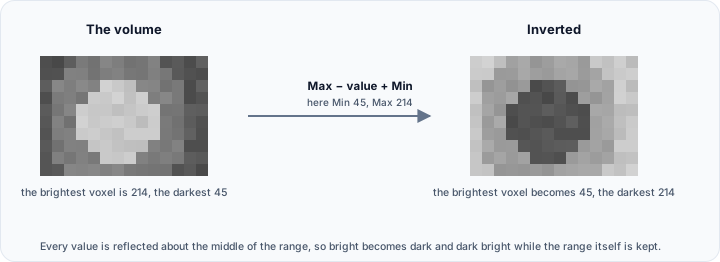
The Invert operation reverses the intensity values of volume images, creating a negative image where bright becomes dark and dark becomes bright.
How It Works
Intensity values are inverted relative to the data range:
Where Max and Min are the maximum and minimum intensity values in the data type or volume.
Use Cases
- Visualization: View structures that are better visible with inverted contrast.
- Compatibility: Convert between imaging conventions (e.g., inverted radiograph display).
- Processing: Prepare data for algorithms expecting opposite intensity polarity.
Workflow
- Select the target volume(s).
- Click Additional → Invert.
- Choose target objects (active, selected, or all).
- Click Apply to invert the intensities.
Scripting
import ScriptingApi as api

app = api.Application()
volume_operations = app.get_volume_operations()

volume_operations.invert_intensity(["Volume1", "Volume2"])
Sharpen
The Sharpen operation enhances edges and fine details in volume images by amplifying high-frequency components.
Available Methods
| Method | Description |
|---|---|
| Laplacian Edge Sharpening | Uses Laplacian operator to detect and enhance edges |
| Convolution-Based Edge Sharpening | Uses convolution kernel for edge enhancement |
| Butterworth High-Pass Filter | Frequency-domain filtering for controlled sharpening |

Use Cases
- Detail enhancement: Make fine structures more visible.
- Edge detection preparation: Enhance boundaries before segmentation.
- Visualization improvement: Increase perceived image sharpness.
Workflow
- Select the target volume(s).
- Click Additional → Sharpen.
- Choose the sharpening method.
- Adjust parameters if applicable.
- Click Apply to sharpen the image.
Over-sharpening can amplify noise and create artifacts. Apply sparingly and review results carefully.
Scripting
import ScriptingApi as api

app = api.Application()
volume_ops = app.get_volume_operations()

# Laplacian sharpening
volume_ops.laplacian_edge_sharpening(["Volume1"])

# Convolution-based sharpening
volume_ops.convolution_based_edge_sharpening(["Volume1"])

# Butterworth high-pass filter
volume_ops.butterworth_high_pass_filter(["Volume1"], 0.1, 0.1)
Correction Filters
The Correction Filters tool provides access to artifact-reduction, normalization, and histogram-balancing workflows that are more specialized than the generic Advanced Filters set.
Workflow
- Select the target volume(s).
- Click Additional → Correction Filters.
- Choose the desired correction filter.
- Adjust the available parameters.
- Click Apply.
See Correction Filters for the full filter list, parameter descriptions, warnings, and scripting examples.
Advanced Filters
The Advanced Filters tool provides access to specialized image processing filters for specific analysis needs.
Accessing Advanced Filters
- Click Additional → Advanced Filters.
- Select the filter type from the dropdown.
- Configure filter parameters.
- Click Apply.
Available Filters
Sigmoid Filter
Applies a sigmoid (S-curve) intensity transformation for contrast adjustment.
| Parameter | Description |
|---|---|
| Output minimum | Minimum output intensity |
| Output maximum | Maximum output intensity |
| Alpha | Controls the sigmoid offset |
| Beta | Controls the sigmoid steepness |
Use case: Non-linear contrast enhancement, preparing data for visualization.
Gradient Magnitude
Computes the magnitude of intensity gradients at each voxel.
Use case: Edge detection, feature enhancement.
Gradient Magnitude Recursive Gaussian
Gradient magnitude with Gaussian smoothing for noise reduction.
| Parameter | Description |
|---|---|
| Sigma (mm) | Gaussian kernel width |
Use case: Robust edge detection in noisy images.
Laplacian of Gaussian
Computes the Laplacian of Gaussian response after smoothing the image with a Gaussian kernel.
| Parameter | Description |
|---|---|
| Sigma (mm) | Gaussian kernel width |
Use case: Blob-like feature enhancement, emphasizing rapid intensity transitions, preparing volumes for marker or feature extraction workflows.
Distance Map Filters
Calculate distance from each voxel to the nearest boundary:
| Filter | Description |
|---|---|
| Danielsson Distance Map | Unsigned distance to nearest non-zero voxel |
| Signed Danielsson Distance Map | Signed distance (positive inside, negative outside) |
| Signed Maurer Distance Map | Efficient signed distance calculation |
Use case: Shape analysis, level set initialization, morphological gradients.
Regional Extrema Filters
Identify local intensity extrema:
| Filter | Description |
|---|---|
| Regional Minima | Identify connected regions at local minimum intensity |
| Regional Maxima | Identify connected regions at local maximum intensity |
Use case: Seed point detection, marker-based segmentation.
Grayscale Morphology Filters
Morphological operations on grayscale images:
| Filter | Description |
|---|---|
| Grayscale Fill Hole | Fill holes in grayscale intensity |
| Grayscale Grind Peak | Remove intensity peaks |
| Opening by Reconstruction | Remove small bright details while preserving larger structures |
| Closing by Reconstruction | Remove small dark details while preserving larger structures |
Opening and closing by reconstruction use separate X, Y, and Z radii in voxels.
Use case: Intensity-based hole filling, peak removal.
Intensity Adjustment
| Filter | Description |
|---|---|
| Rescale Intensity | Map intensity to specified range [min, max] |
| Clamp Intensity | Clamp values outside a selected range to the nearest bound |
| Intensity Windowing | Remap an input range to a selected output range with saturation outside the window |
| Normalize | Zero mean, unit variance normalization |
Use case: Standardizing intensity ranges, preparing for multi-dataset analysis.
Unsharp Mask
Enhances local contrast by subtracting a blurred version of the image and adding the residual back.
| Parameter | Description |
|---|---|
| Sigma (mm) | Gaussian blur width used to estimate the low-frequency background |
| Amount | Sharpening strength applied to the residual |
Use case: Highlighting fine edges and local detail in reconstructed or segmented volumes without switching to the separate Sharpen tool.
Scripting Examples
import ScriptingApi as api

app = api.Application()
volume_operations = app.get_volume_operations()

# Sigmoid filter
volume_operations.sigmoid_filter(["Volume1"], 0, 255, 128, 0.05)

# Gradient magnitude
volume_operations.gradient_magnitude_filter(["Volume1"])

# Gradient magnitude with Gaussian
volume_operations.gradient_magnitude_recursive_gaussian_filter(["Volume1"], 1.0)

# Laplacian of Gaussian
volume_operations.laplacian_of_gaussian_filter(["Volume1"], 1.0)

# Distance maps
volume_operations.danielsson_distance_map_filter(["Volume1"])
volume_operations.signed_danielsson_distance_map_filter(["Volume1"])
volume_operations.signed_maurer_distance_map_filter(["Volume1"])

# Regional extrema
volume_operations.regional_minima_filter(["Volume1"])
volume_operations.regional_maxima_filter(["Volume1"])

# Grayscale morphology
volume_operations.grayscale_fill_hole_filter(["Volume1"], api.VoxelConnectivity.Connectivity6)
volume_operations.grayscale_grind_peak_filter(["Volume1"])
volume_operations.opening_by_reconstruction_filter(["Volume1"], [1, 1, 1])
volume_operations.closing_by_reconstruction_filter(["Volume1"], [1, 1, 1])

# Intensity adjustment
volume_operations.rescale_intensity_filter(["Volume1"], 0, 255)
volume_operations.clamp_intensity_filter(["Volume1"], 10, 120)
volume_operations.intensity_windowing_filter(["Volume1"], 10, 120, 0, 255)
volume_operations.normalize_filter(["Volume1"])
volume_operations.unsharp_mask_filter(["Volume1"], 1.0, 0.5)
See the VolumeOperations API Reference for details.