Volume Mesh to Surface
The Volume Mesh to Surface tool extracts the outer boundary of a volume mesh to create a surface mesh object. This conversion is useful when you need a triangular surface representation from tetrahedral volume data, for example for visualization, surface-based analysis, or export to surface-only formats.
Accessing the Tool
Navigate to the Volume Mesh ribbon tab and click Volume Mesh To Surface in the Convert section.
How It Works
The conversion process extracts the external boundary faces of the volume mesh. In a tetrahedral mesh, each tetrahedron has four triangular faces. Faces that are shared between two adjacent tetrahedra are internal and not included in the output. Only faces that belong to a single tetrahedron—meaning they are on the mesh boundary—are extracted and combined to form the resulting surface mesh.
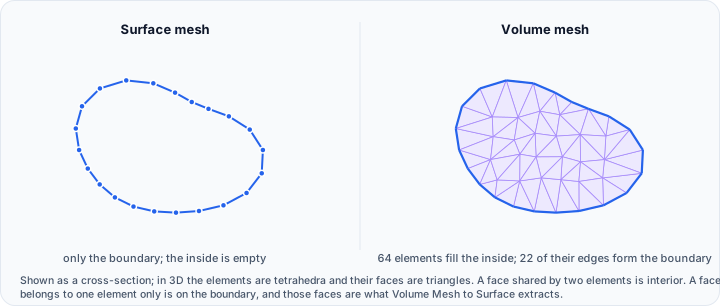
Vertex positions are carried over exactly as they are in the volume mesh, and the face normals of the result are checked and reoriented so they point outward, which is what every downstream surface tool and export format expects.
Target Object(s)
Select which volume mesh objects to convert:
| Target | Description |
|---|---|
| Active volume mesh object | Convert only the currently active mesh |
| Selected volume mesh object(s) | Convert every volume mesh selected in the Scene Tree |
| Visible volume mesh object(s) | Convert every volume mesh currently shown in the views |
| All volume mesh objects | Convert every volume mesh in the project |
Applying the Conversion
- Select the target volume mesh(es) using the dropdown
- Click Apply to execute the conversion
- New surface objects are created in the project
- The original volume meshes remain unchanged
Each converted volume mesh produces one corresponding surface object, named after the source mesh with (from volume mesh) appended, so the two stay easy to tell apart in the Scene Tree.
Use Cases
Visualization and Rendering
Surface meshes are often more efficient for visualization than full volume meshes. Converting to surface allows:
- Faster rendering of complex models
- Standard surface visualization tools (shading, materials, colors)
- Export to common 3D formats (STL, OBJ, PLY)
Surface-Based Analysis
Some analysis operations work on surface geometry:
- Surface area calculations
- Curvature analysis
- Distance calculations to other surfaces
- Boolean operations with other surfaces
Multi-Format Workflows
When sharing models with collaborators who use surface-based software:
- Export as STL for 3D printing workflows
- Convert for use in CAD systems
- Share with visualization software
Quality Verification
Extract the surface to visually verify the volume mesh boundary:
- Identify any unexpected holes or gaps
- Check for correct normal orientations
- Examine boundary quality before FEM export
Relationship to Surface Tab
The resulting surface objects can be further processed using tools in the Surface ribbon tab:
- Render Properties - Control surface visualization
- Transform - Modify position and orientation
- Boolean - Combine with other surfaces
- Smooth - Reduce surface roughness
- Reduce - Decrease triangle count
Related Tools
- Render Properties - Visualize volume mesh before conversion
- Surface to Volume Mesh - Create volume mesh from surface (reverse operation)