Rendering Types
Volvicon provides multiple rendering methods to visualize 3D data. Each method is suited for different data types and visualization goals.
Volume Rendering
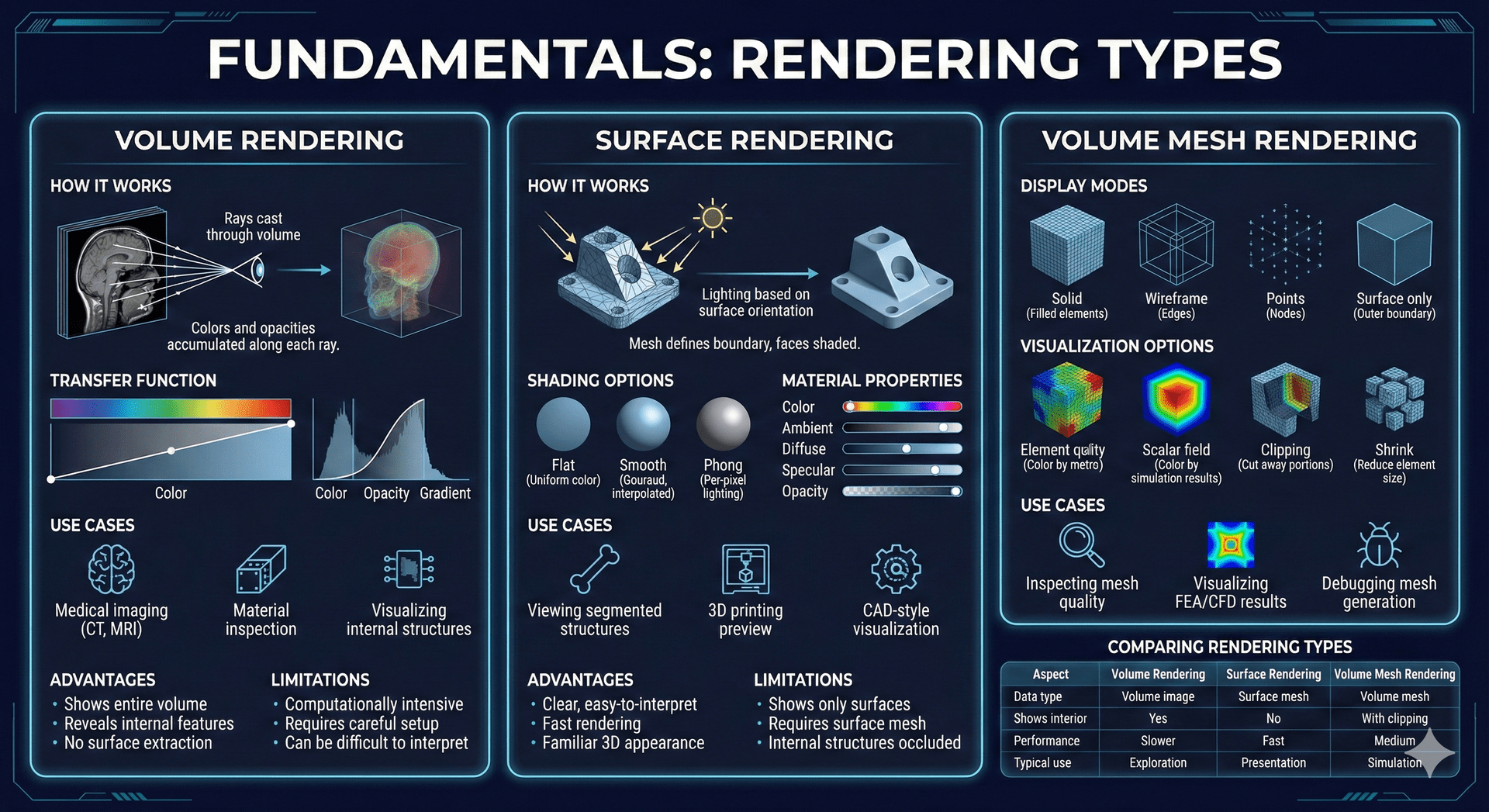
Volume rendering displays the entire 3D volume image by assigning colors and opacity to intensity values. It allows you to see through the data and visualize internal structures.
How it Works
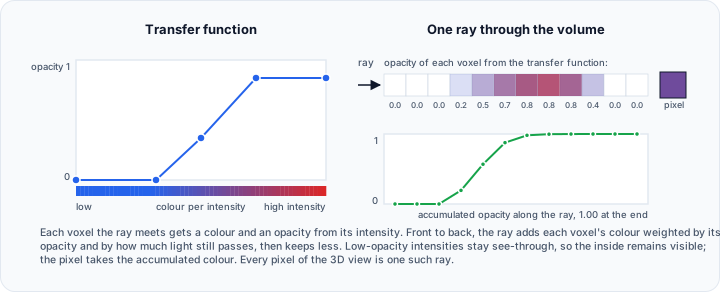
- Each voxel is assigned a color and opacity based on its intensity
- Rays are cast through the volume from the viewer's perspective
- Colors and opacities are accumulated along each ray
- The result shows a semi-transparent 3D view of the data
Transfer Function
The transfer function controls how intensities are mapped to visual properties:
| Component | Description |
|---|---|
| Color | Assigns colors to intensity ranges |
| Opacity | Controls transparency (0 = invisible, 1 = solid) |
| Gradient | Uses intensity changes to highlight edges |
Use Cases
- Visualizing internal structures without cutting
- Showing density variations within objects
- Medical imaging (CT, MRI visualization)
- Material inspection
Advantages
- Shows entire volume at once
- Reveals internal features
- No surface extraction required
Limitations
- Computationally intensive
- Requires careful transfer function setup
- Can be difficult to interpret dense data
Surface Rendering
Surface rendering displays surface meshes as solid objects with lighting and shading. It provides a clear view of object boundaries.
How it Works
- Surface mesh defines the object boundary
- Lighting calculations determine brightness based on surface orientation
- Faces are shaded to create a 3D appearance
Shading Options
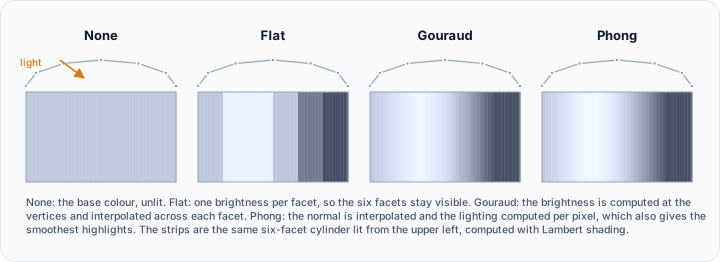
Set Shading interpolation: in the surface material properties:
| Option | Description |
|---|---|
| None | No shading is applied; the surface is drawn in its flat base color |
| Flat | Each face has a uniform color, so individual triangles stay visible (default) |
| Gouraud | Color is interpolated across each face, giving a smooth appearance |
| Phong | Lighting is computed per pixel, giving the smoothest highlights |
| Physically-based rendering | Lighting is computed from physical material properties, and enables the Roughness: and Metallic: settings |
Material Properties
| Property | Description |
|---|---|
| Material color | The Ambient color:, Diffuse color:, and Specular color: of the surface |
| Ambient: | Strength of the uniform lighting component, in percent |
| Diffuse: | Strength of the light scattered in all directions, in percent |
| Specular: | Strength of the shiny highlights, in percent |
| Shininess: | How tight the specular highlight is |
| Opacity | Transparency of the surface, in percent |
Use Cases
- Viewing segmented structures
- 3D printing preview
- CAD-style visualization
- Presentation and reporting
Advantages
- Clear, easy-to-interpret images
- Fast rendering
- Familiar 3D appearance
Limitations
- Shows only surfaces, not interior
- Requires surface mesh generation
- Complex internal structures may occlude each other
Volume Mesh Rendering
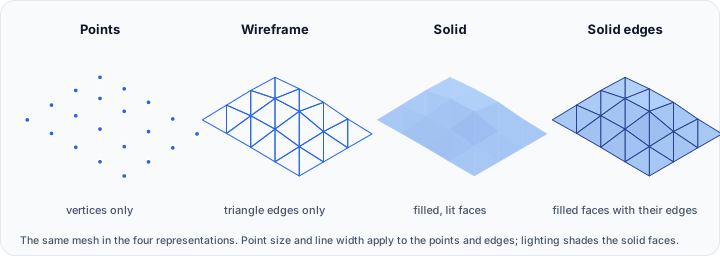
Volume mesh rendering displays tetrahedral or hexahedral meshes used for simulation. It can show the mesh structure or simulation results.
Display Modes
| Mode | Description |
|---|---|
| Solid | Filled elements with lighting |
| Wireframe | Only edges visible |
| Points | Only nodes visible |
| Surface only | Shows outer boundary |
Visualization Options
| Option | Description |
|---|---|
| Element quality | Color by mesh quality metrics |
| Scalar field | Color by simulation results (stress, temperature) |
| Clipping | Cut away portions to see interior |
| Shrink | Reduce element size to see structure |
Use Cases
- Inspecting mesh quality before simulation
- Visualizing FEA/CFD results
- Debugging mesh generation
Comparing Rendering Types
| Aspect | Volume Rendering | Surface Rendering | Volume Mesh Rendering |
|---|---|---|---|
| Data type | Volume image | Surface mesh | Volume mesh |
| Shows interior | Yes | No | With clipping |
| Performance | Slower | Fast | Medium |
| Typical use | Exploration | Presentation | Simulation |
Related Topics
- Volume Grayscale Image – Data for volume rendering
- Surface Mesh – Data for surface rendering
- Volume Mesh – Data for volume mesh rendering