Surface Mesh
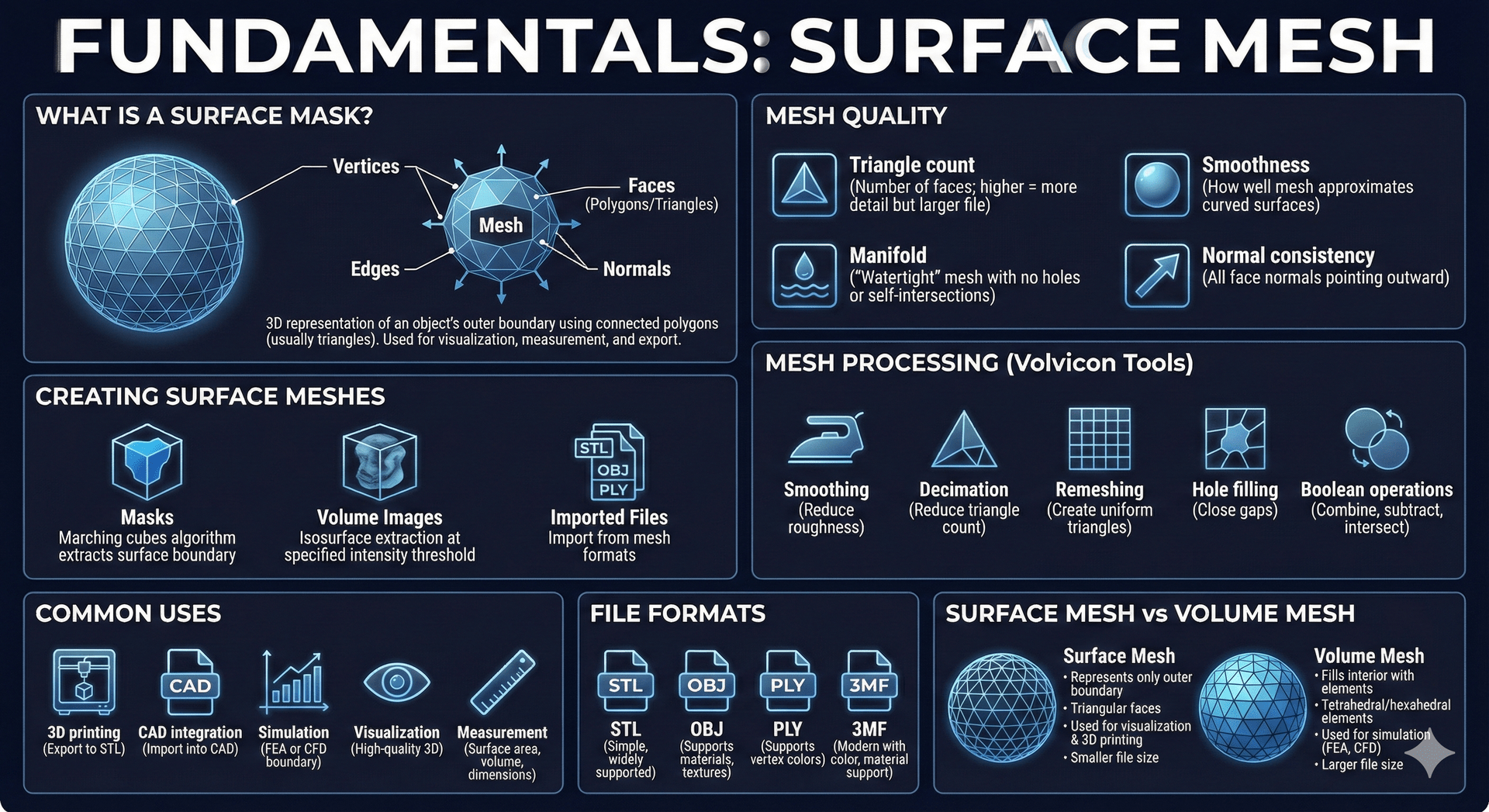
A surface mesh is a 3D representation of an object's outer boundary using connected polygons. In Volvicon, surface meshes are typically generated from masks, imported from mesh files, or reconstructed from point clouds, and are used for visualization, measurement, and export.
What is a Surface Mesh?
A surface mesh consists of:
| Component | Description |
|---|---|
| Vertices | Points in 3D space (X, Y, Z coordinates) |
| Edges | Lines connecting vertices |
| Faces | Polygons (usually triangles) formed by edges |
| Normals | Vectors perpendicular to faces, used for lighting |
Triangular meshes are most common because triangles are always planar and easy to render.

Creating Surface Meshes
Surface meshes can be created from:
| Source | Method |
|---|---|
| Masks | Marching cubes algorithm extracts the surface boundary |
| Volume images | Segment the volume into a mask, then use Mask To Surface. The Isosurface Renderer displays a surface in the 3D view but does not create a surface object. |
| Imported files | STL, OBJ, PLY, and other mesh formats |
| Point clouds | Poisson reconstruction builds a closed mesh from imported points |
Point Clouds
A point cloud is a set of 3D points with no edges and no faces. Volvicon imports point clouds from .xyz files and shows them as a surface object so they can be viewed, positioned, and measured against other data.
A point cloud has no surface, so any tool that needs faces is unavailable until the points are reconstructed into a mesh. That includes surface area and closed volume measurement, boolean operations, mesh repair, and export to formats that store triangles.
Use Poisson Remesh to build a watertight triangle mesh from an imported point cloud. The reconstructed mesh is a new surface object and behaves like any other mesh from that point on.
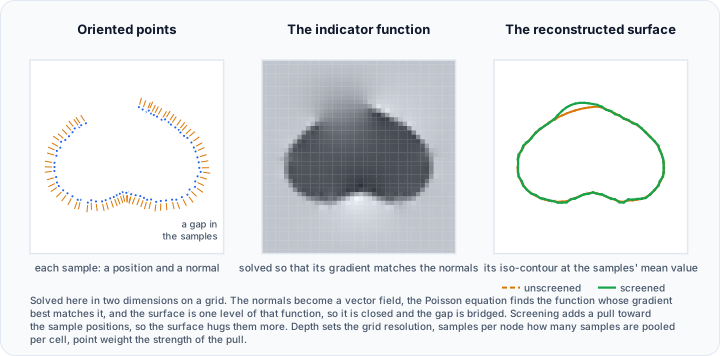
Point files carry positions only. Poisson reconstruction estimates the normals it needs from the points themselves, so no extra data is required in the file.
Mesh Quality
Mesh quality affects both visualization and downstream use:
| Factor | Description |
|---|---|
| Triangle count | Number of faces; higher = more detail but larger file |
| Smoothness | How well the mesh approximates curved surfaces |
| Manifold | A "watertight" mesh with no holes or self-intersections |
| Normal consistency | All face normals pointing outward |
Mesh Processing
Volvicon provides tools to improve mesh quality:
| Operation | Description |
|---|---|
| Smoothing | Reduce surface roughness while preserving shape |
| Decimation | Reduce triangle count while maintaining shape |
| Remeshing | Create uniform triangle sizes |
| Hole filling | Close gaps in the mesh |
| Boolean operations | Combine, subtract, or intersect meshes |
Common Uses
Surface meshes are used for:
- 3D printing – Export to STL for additive manufacturing
- CAD integration – Import into CAD software for design
- Simulation – Boundary conditions for FEA or CFD
- Visualization – High-quality 3D rendering
- Measurement – Surface area, volume, dimensions
File Formats
| Format | Description |
|---|---|
| STL | Simple format, widely supported, no color |
| OBJ | Supports materials and textures |
| PLY | Supports vertex colors |
| 3MF | Modern format with color and material support |
| XYZ | Plain point positions with no faces, imported as a point cloud |
For the full list of extensions accepted in each direction, see Import and Export.
Surface import reads geometry. Scene structure, animation, cameras, lights, and texture image references are not carried over. A material colour is kept where the format stores one. If a texture image sits next to the mesh file and shares its name, that image is applied to the imported surface.
Surface Mesh vs Volume Mesh
| Surface Mesh | Volume Mesh |
|---|---|
| Represents only the outer boundary | Fills the interior with elements |
| Triangular faces | Tetrahedral or hexahedral elements |
| Used for visualization and 3D printing | Used for simulation (FEA, CFD) |
| Smaller file size | Larger file size |
Related Topics
- Masks – Source for surface mesh generation
- Volume Mesh – Interior mesh for simulation
- Rendering Types – Visualizing surface meshes