Scripting API
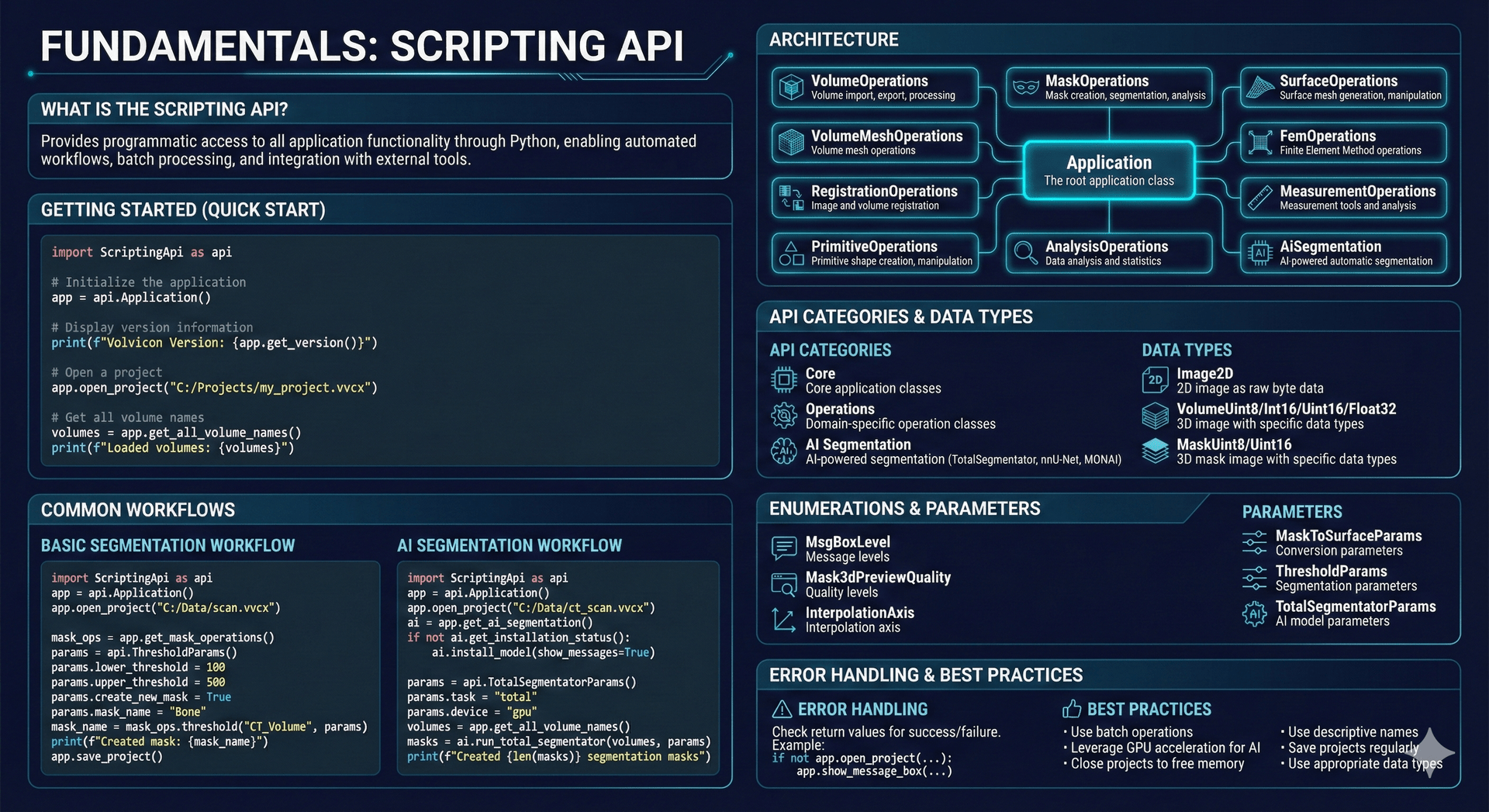
The Volvicon Scripting API provides programmatic access to application functionality through Python, enabling automated workflows, batch processing, custom analysis pipelines, and integration with external tools.
The Volvicon Python scripting environment includes support for NumPy, SciPy, Pillow, matplotlib, and pandas. Start scripting immediately with no additional setup required. See the Batch Processing & Automation tutorial for practical examples.
You can also describe a task in plain language and let the AI Assistant write the script for you, then run it after your approval. It can run locally on your own computer. See Writing & Running Scripts.
What is the Scripting API?
The Scripting API allows you to control Volvicon programmatically using Python scripts. Instead of manually performing repetitive tasks through the user interface, you can write scripts that automate operations, process multiple datasets, and create custom workflows.
| Feature | Description |
|---|---|
| Automation | Execute repetitive tasks without manual interaction |
| Batch processing | Process multiple volumes, masks, or surfaces in sequence |
| Custom workflows | Combine operations in ways not available through the GUI |
| Integration | Connect with external analysis tools or databases |
| Reproducibility | Document and repeat analysis procedures consistently |
The Scripting API is particularly useful for research projects requiring reproducible analysis protocols and for industrial applications involving high-throughput inspection procedures.
Architecture Overview
The API is organized around a central Application class that provides access to specialized operation modules. Each module handles a specific data type or operation category.
import ScriptingApi as api

app = api.Application()
Operation Modules
| Module | Purpose |
|---|---|
| VolumeOperations | Import, export, filter, and process volume images |
| MaskOperations | Create, edit, and analyze segmentation masks |
| SurfaceOperations | Generate and modify surface meshes |
| VolumeMeshOperations | Work with volumetric tetrahedral meshes |
| MeasurementOperations | Create measurement objects and extract geometric data |
| MeasureOperations | Compute statistical measures on images and meshes |
| PrimitiveOperations | Create and manipulate geometric primitives (ROIs) |
| RegistrationOperations | Align multiple datasets spatially |
| AnalysisOperations | Perform specialized analysis procedures |
| AiSegmentation | Apply AI models for automated segmentation |
Each module is accessed through the Application object:
mask_operations = app.get_mask_operations()
surface_operations = app.get_surface_operations()
ai_segmentation = app.get_ai_segmentation()
Basic Script Structure
A typical Volvicon script follows this structure:
import ScriptingApi as api

# Initialize application
app = api.Application()

# Open project or import data
app.open_project("C:/Projects/sample.vvcx")

# Get operation modules
mask_operations = app.get_mask_operations()

# Perform operations
volumes = app.get_all_volume_names()
print(f"Loaded volumes: {volumes}")

# Save results
app.save_project()
Common Workflows
Threshold Segmentation
Create a mask from a volume by selecting voxels within an intensity range:
import ScriptingApi as api

app = api.Application()
app.open_project("C:/Data/scan.vvcx")

mask_operations = app.get_mask_operations()

# Configure threshold parameters
threshold_params = api.ThresholdParams()
threshold_params.lower_threshold = 226
threshold_params.upper_threshold = 10000
threshold_params.create_new_mask = True
threshold_params.mask_name = "Bone"

# Apply threshold
mask_name = mask_operations.threshold("CT_Volume", threshold_params)
print(f"Created mask: {mask_name}")
AI-Based Segmentation
Use TotalSegmentator for automated anatomical segmentation:
import ScriptingApi as api

app = api.Application()
app.open_project("C:/Data/ct_scan.vvcx")

# Access AI segmentation module
ai_segmentation = app.get_ai_segmentation()
ai_segmentation.set_model_type(api.AiSegmentationModelType.TotalSegmentator)

# Configure parameters
params = api.TotalSegmentatorParams()
params.task = "total"
params.device = "gpu"

# Run segmentation
volumes = app.get_all_volume_names()
masks = ai_segmentation.run_total_segmentator(volumes, params)
print(f"Created {len(masks)} masks")
AI segmentation results must be verified by qualified personnel before use in any clinical or diagnostic context. Volvicon is not certified for clinical diagnostic use.
Surface Generation
Generate a triangular mesh from a segmentation mask:
import ScriptingApi as api

app = api.Application()
app.open_project("C:/Data/scan.vvcx")

mask_operations = app.get_mask_operations()
surface_operations = app.get_surface_operations()

# Configure surface generation parameters
mask_to_surface_params = api.MaskToSurfaceParams()
mask_to_surface_params.smooth_iterations = 10
mask_to_surface_params.triangle_reduction_percent = 90

# Generate surface
surface_name = mask_operations.convert_to_surface_objects(["Bone"], mask_to_surface_params)
print(f"Created surface: {surface_name}")

# Export to STL
surface_operations.export_surface_to_disk(surface_name[0], "C:/output/surface.stl")
Batch Processing
Process multiple volumes in a directory:
import ScriptingApi as api
import os

app = api.Application()
volume_operations = app.get_volume_operations()
mask_operations = app.get_mask_operations()

input_dir = "C:/output/Volumes/"
output_dir = "C:/output/Results/"

# Process each file
for filename in os.listdir(input_dir):
    if filename.endswith(".nii.gz"):
        filepath = os.path.join(input_dir, filename)

        # Import volume
        volume_name = volume_operations.import_3d_image_from_disk(filepath)

        # Segment
        threshold_params = api.ThresholdParams()
        threshold_params.lower_threshold = 226
        threshold_params.upper_threshold = 10000
        mask_name = mask_operations.threshold(volume_name, threshold_params)

        # Export mask
        mask_operations.export_mask_images_to_disk([mask_name], output_dir, "nii.gz")

        # Clean up
        app.delete_masks([mask_name])
        app.delete_volumes([volume_name])

print("Batch processing complete")
Data Types
The API provides classes for working with volumetric data programmatically:
| Type | Description |
|---|---|
| VolumeUint8 | 8-bit unsigned integer volume (0–255) |
| VolumeInt16 | 16-bit signed integer volume (-32768 to 32767) |
| VolumeUint16 | 16-bit unsigned integer volume (0–65535) |
| VolumeFloat32 | 32-bit floating-point volume |
| MaskUint8 | 8-bit mask (255 labels maximum) |
| MaskUint16 | 16-bit mask (65535 labels maximum) |
| Image2D | 2D image for snapshots and textures |
These classes include properties for dimensions, spacing, origin, and raw data access, enabling direct manipulation of voxel data.
Structured result objects can also be annotated to improve editor suggestions:
measure_operations = app.get_measure_operations()

stats : api.VolumeStatisticsResult = measure_operations.compute_volume_statistics(
    "CT_Volume",
    api.VolumeStatisticsParams()
)
print(stats.mean_intensity)
For lists of API objects, annotate the item inside the loop:
labels = mask_operations.get_mask_labels("Mask_1")
for item in labels:
    label : api.MaskLabelInfo = item
    print(label.value, label.annotation)
Object Management
Listing Objects
Retrieve names of objects in the current project:
volumes = app.get_all_volume_names()
masks = app.get_all_mask_names()
surfaces = app.get_all_surface_names()
meshes = app.get_all_volume_mesh_names()
Visibility Control
Show or hide objects in the 3D and 2D views:
app.set_volumes_visible(["CT_Volume"], True)

volume_operations = app.get_volume_operations()
volume_render_properties_operations = volume_operations.get_render_properties_operations()
volume_render_properties_operations.set_shade_enabled(["CT_Volume"], True)

app.set_masks_visible(["Bone"], True)
Deleting Objects
Remove objects from the project:
app.delete_volumes(["Volume1", "Volume2"])
app.delete_masks(["Mask1"])
app.delete_surfaces(["Surface1"])
Error Handling
Operations that can fail return a boolean or empty string to indicate errors. Check return values before proceeding:
if not app.open_project("C:/Data/project.vvcx"):
    app.show_message_box("Failed to open project", "Error", api.MsgBoxLevel.Error)
else:
    # Continue with operations
    pass
For operations that return object names, an empty string or empty list indicates failure:
mask_name = mask_operations.threshold("Volume", threshold_params)
if not mask_name:
    print("Threshold operation failed")
Scripting Editor
Volvicon includes an integrated Python editor for developing and executing scripts directly within the application. The editor provides:
- Syntax highlighting and code completion
- Type annotations for structured API results and list items, so member suggestions appear after
. - Integrated console for output and errors
- Templates for common operations
- Access to the Scripting API without external Python installation
See the Scripting Editor documentation for details on using the built-in editor.
Best Practices
| Practice | Rationale |
|---|---|
| Use descriptive object names | Improves script readability and maintainability |
| Check return values | Detect errors early and handle them appropriately |
| Save projects incrementally | Preserve intermediate results during long workflows |
| Clean up temporary objects | Reduce memory usage in batch processing |
| Document complex logic | Add comments explaining non-obvious operations |
For large batch processing tasks, delete intermediate objects that are no longer needed to avoid memory exhaustion. Process volumes sequentially rather than loading all data simultaneously.
Use Cases
Industrial Inspection
Automated defect detection and dimensional measurement in CT scans of manufactured parts. Scripts can apply consistent acceptance criteria across production runs and generate standardized reports.
Research Workflows
Reproducible analysis pipelines for biomedical or materials science research. Scripts ensure that the same segmentation parameters and measurements are applied uniformly across all specimens.
Quality Control
Batch processing of inspection data with pass/fail criteria. Scripts can flag non-conforming parts, export defect maps, and compile statistical summaries for quality management systems.
Related Topics
- Scripting API Overview – Detailed API documentation
- Quick Reference – Common API operations
- Scripting Editor – Using the built-in Python editor
- Python Scripting Fundamentals – Step-by-step scripting guide